
Switching Payroll Providers Mid-Year: A Bad Import Breaks the Wage Base
Switching payroll providers does not reset an employee’s Social Security, FUTA or state unemployment wage base. The wages already paid this year still count, whoever runs payroll. A bad year-to-date (YTD) import is what makes the new system act as if they never happened.
The result is over-withheld Social Security, overpaid FUTA and SUTA, and corrected returns that someone has to file. This guide covers the figures at risk in 2026, what an import must carry over and how to correct a bad one. It is written for cannabis and other high-risk employers who change providers in the middle of a year.
TL;DR
- The wage base belongs to the employee and the tax year, not to the payroll provider. A switch does not reset it.
- A bad import that shows too little YTD wages causes over-withholding and over-payment. One that shows too much causes under-withholding and under-payment.
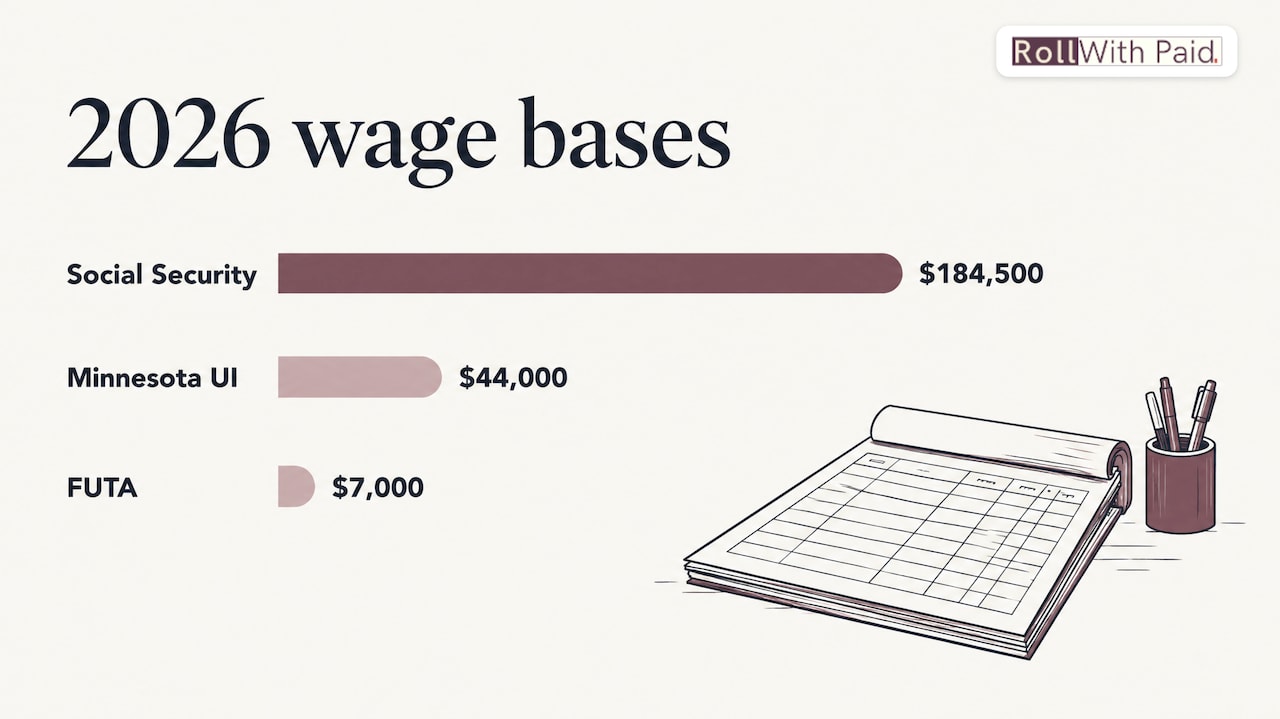
- The 2026 Social Security wage base is $184,500, the FUTA base is $7,000, and Minnesota’s state unemployment base is $44,000.
- Each affected quarter needs its own Form 941-X, and an affected W-2 needs a W-2c.
- Reconcile the opening balances to your old registers before the first payroll runs, not after.
Table of Contents
- Does switching payroll providers reset the wage base?
- Which wage limits does a bad import put at risk in 2026?
- What does a bad import look like in dollars?
- Which records must move to the new provider?
- How do you reconcile opening balances against your old records?
- Who files what after a mid-year switch?
- How do you correct a bad import after payroll has run?
- Which mid-year switch scenarios do high-risk employers face most?
- How does a managed switch compare with importing data into new software?
- What should you ask before you switch?
- Where can a cannabis employer get switch-ready payroll and HR?
- Perspective: why the import is the real switching risk
- FAQ
- Sources
Does switching payroll providers reset the wage base?
No. A wage base is the amount of an employee’s yearly wages that a tax applies to, and it follows the calendar year. The IRS’s 2026 Publication 15 states that Social Security tax has a wage-base limit and that Medicare tax has none.
The same employer identification number (EIN) keeps the same tax history when you change vendors. The new provider only knows that history if you give it the data. Reset happens when the import fails, not when the contract changes.
The point is the same for a dispensary, a cultivation site, a restaurant group or a trades contractor. If you change providers on July 1, an employee who earned $60,000 in the first half still has $60,000 on the books for the year.
Which wage limits does a bad import put at risk in 2026?
A bad import puts three limits at risk in 2026: Social Security, FUTA and your state unemployment base. Each stops tax once an employee’s wages reach a ceiling, so a wrong opening balance moves the point where tax stops.
| Tax | 2026 figure | What it means | Source |
|---|---|---|---|
| Social Security | $184,500 wage base; 6.2% each for employee and employer | Tax stops after an employee’s wages reach the base | IRS Publication 15 |
| Medicare | 1.45% each for employee and employer, no wage base | No ceiling to mis-import, but wages must still be right | IRS Publication 15 |
| FUTA | 6.0% on the first $7,000 of each employee’s wages, before state credits | Employer-paid; applies once per employee per year | IRS Publication 15 |
| Minnesota unemployment insurance | $44,000 taxable wage base | Indexed to the state average wage and can change every year | Minnesota UI |
California’s EDD publication confirms the same federal figures for 2026, $184,500 for Social Security and $7,000 for FUTA. Every state sets its own unemployment base, so a multi-state operator needs one correct opening balance per employee per state.
These figures change on a schedule. The Social Security base is set each year, and Minnesota indexes its base to the state average wage. Confirm each against the issuing agency’s page when you set up a new provider.
What does a bad import look like in dollars?
A bad import that drops YTD wages to zero makes the new system keep taxing wages the law has already stopped taxing. Here is a worked example using the 2026 Social Security base.
A general manager at a multi-state operator earns $240,000 a year, paid evenly. By June 30 the manager has $120,000 in YTD wages. The provider switch happens July 1.
- Correct import: the new provider sees $120,000 YTD. Social Security tax applies to another $64,500 ($184,500 minus $120,000), then stops.
- Bad import with zero YTD: the new provider sees $0. Social Security tax applies to all $120,000 of second-half wages, because the cap looks far away.
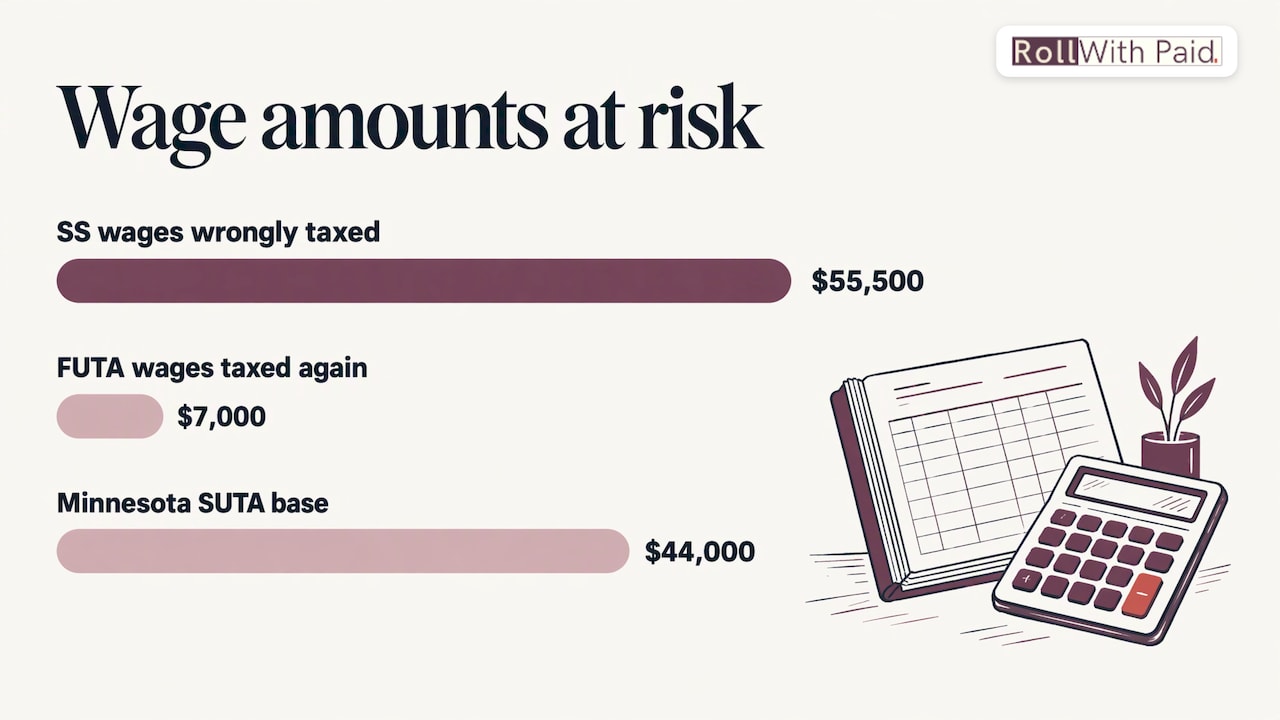
- The gap: $55,500 of wages taxed that should not have been. At 6.2%, that is $3,441 withheld from the manager and another $3,441 paid by the employer.
FUTA works the same way. An employee who passed $7,000 by March should generate no more FUTA. If the import loses those wages, the new system taxes another $7,000. At 6.0% before credits, that is $420 of computed FUTA per employee.
State unemployment (SUTA) multiplies the problem. A 40-person crew that all lose their YTD wages can each be taxed again up to the state base. Minnesota’s base is $44,000 in 2026, taxed at your assigned rate.
The error also runs the other way. If the import overstates YTD wages, the system stops withholding too early. The employee then owes more at filing and the employer under-deposits.
Which records must move to the new provider?
The new provider needs employee-level YTD wages, taxes, deductions and contributions, plus the company’s tax setup. The National Payroll Reporting Consortium (NPRC), an industry group of payroll providers, published switching guidance on March 23, 2026. It calls for YTD figures by prior quarter and by each pay date in the open quarter.
The same NPRC guidance lists the records that must come with those totals:
- Legal entity and federal and state tax setup.
- Employee name, hire date, Social Security number and addresses.
- Compensation, filing status, allowances and additional withholding.
The NPRC also recommends getting this data from the prior provider and handing it to the new one before the first payroll. Quarter-by-quarter detail matters because quarterly returns are built from it, not only the running total.
For high-risk employers, add three items. List every state where each employee has worked, since unemployment bases apply per state. List worker classification codes, because workers’ compensation premiums follow them. List any pending off-cycle payments or voided checks, which often sit outside the standard export.
How do you reconcile opening balances against your old records?
Reconcile opening balances by matching the import to the old provider’s final registers and filed returns, not to the import screen. A file that loads without errors is not proof that the totals are right.
Three tests catch most problems:
- Total test. Compare imported YTD gross wages, withholding and employer taxes to the old provider’s last payroll register and its filed quarterly returns. Totals should match to the penny.
- Employee test. Sort employees by YTD Social Security wages. Anyone near $184,500 should show a figure near $184,500 in the new system. Anyone with wages above $7,000 should show FUTA wages of exactly $7,000.
- Quarter test. Compare each prior quarter’s imported wages to the Form 941 already filed for that quarter. A mismatch means an employee, a pay date or an adjustment was dropped or doubled.
Run these before the first payroll. After the first payroll, check that each employee’s wage-base line moved by the right amount. A tax that is withheld on someone who should have crossed the cap shows up in that first pay run.
We treat this reconciliation as part of the switch, not a cleanup task afterward. Our Payroll Software Problem page shows the kinds of failures that make a switch painful.
Who files what after a mid-year switch?
You and both providers must agree in writing who pays and files each tax and annual return. The NPRC’s March 2026 guidance recommends confirming which provider will pay and file each tax and return, including Forms W-2, 1099, 940 and employment tax returns. The goal is to avoid duplicate filings.
The usual split looks like this:
| Item | Typical owner after a mid-year switch |
|---|---|
| Deposits and returns for periods before the cutoff | Old provider, until the final filing is done |
| Deposits and returns after the cutoff | New provider |
| Form 941 for the switch quarter | Agreed in advance; wages from both providers must be combined |
| Forms W-2 and 940 for the year | New provider, if it holds the full-year data |
The switch quarter is where duplicates and gaps appear. If both providers file a 941 for the same quarter, the IRS sees two returns. If neither does, you have a late filing.
Cannabis employers carry an added risk. Banks, landlords and regulators may ask for proof that taxes were filed and paid on time. A clean handoff makes that proof easy to produce.
How do you correct a bad import after payroll has run?
File a separate Form 941-X for each quarter that needs correction, and issue a W-2c if an employee’s W-2 is affected. The Form 941-X instructions (revised April 2026) set the rules. The Social Security Administration also says a separate Form 941-X is required for each affected Form 941, and that it must not be attached to a Form 941.
The form offers two routes:
- Adjustment process: covers underreported tax and certain overreported amounts.
- Claim process: covers overreported tax only.
Over-withheld Social Security from the example above is an overcollection from the employee. The Form 941-X requires certifications when correcting overcollected employee taxes. These include repayment or reimbursement of the affected employees or, for claims in specified circumstances, employee consent and statements that the amount is not claimed elsewhere.
In practice, that means you refund the employee first or get written consent. Do this before you ask the IRS for the money back.
For W-2 errors, the SSA’s guidance says to file Forms W-2c and W-3c as soon as possible after discovering an error in a submitted W-2. It also says to give the employee a W-2c as soon as possible. If several W-2s were filed for one employee in a year, SSA’s POMS guidance on corrected wage reports says the W-2c should show the combined amounts across those forms.
State unemployment overpayments follow state rules. Contact the state agency, such as Minnesota’s Unemployment Insurance office, to learn how it adjusts wage detail. Your CPA or tax counsel should confirm the correction path for each filing.
Which mid-year switch scenarios do high-risk employers face most?
The same import problem appears differently by business type. These are common use cases, described generally.
Single-state dispensary. A dispensary with 35 employees moves providers on July 1 because its current vendor will not handle cannabis payroll reliably. The main risk is wage-base data for long-tenured managers and any tipped or bonus pay. The reconciliation test is the YTD Social Security sort.
Multi-state operator. An operator with sites in Minnesota and another state moves an employee between locations in March. Unemployment wages must be tracked by state. A bad import can place all YTD wages in one state and tax the second state again from zero.
Cultivation facility with seasonal crews. A cultivation site rehires seasonal trimmers who worked earlier in the year. If the import treats a rehire as a new hire, FUTA and SUTA base counts can restart. Hire dates and rehire flags need to be carried over.
Restaurant, bar or hospitality group. Tip reporting and multiple locations create extra YTD lines. Our hospitality case study shows how a hospitality employer approached payroll and HR.
Construction and trades. Crews move across job sites and states, and workers’ compensation class codes differ by trade. Our construction and trades case study covers that setting.
In Minnesota, a local minimum wage change can also land mid-year. Our Minneapolis minimum wage guide explains the payroll steps. Treat that change and a provider switch as two separate tasks so one does not hide errors in the other.
How does a managed switch compare with importing data into new software?
A managed switch puts a team on the reconciliation, while a software-only import leaves it to you. Both start with the same files. What differs is who checks them.
| Factor | Software-only import | Managed Employer of Record switch |
|---|---|---|
| Who loads YTD data | Your staff | Provider team |
| Who reconciles to old registers | You | Provider team with you |
| Multi-state wage bases | You set up each state | Provider handles multi-state payroll |
| Workers’ compensation and class codes | Separate vendor | Part of the Employer of Record model |
| Risk when the import is wrong | Falls on your tax account | Addressed in the provider’s process |
For cannabis employers the stakes are higher because many mainstream providers will not take the account. Our comparison pages cover specific alternatives, including Roll With Paid vs. Paychex, Roll With Paid vs. Paragon Payroll and a four-week switch plan for cannabis employers. To see how Employer of Record works for these industries, read Understanding Employer of Record for High-Risk Industries.
What should you ask before you switch?
Ask five questions before you sign, and get the answers in writing.
- Which provider files the Form 941 for the switch quarter?
- How will YTD wages be loaded: by quarter and pay date, or as one total?
- Who reconciles the import to the old registers, and when?
- How are multi-state wages and worker classification codes carried over?
- Who files the W-2s and Form 940 for the year?
For a wider view of workforce management, see our pillar guides on the CHRO function and human capital management. Our services overview lists everything we handle for high-risk employers.
Where can a cannabis employer get switch-ready payroll and HR?
Roll With Paid. provides payroll and HR solutions for high-risk industries, with a focus on cannabis. Our services include Payroll Execution, Employer of Record, HR and Compliance Solutions, Seamless Employee Onboarding, Multi-State Hiring Support and Time and Attendance Tools. We report zero late filings across our client work.
Our monthly fees are based on gross payroll, with an optional flat-rate HR retainer, and rates vary by worker classification code and headcount. See pricing for how that works, or start at rollwithpaid.com.

We also publish a newsletter for employers in regulated industries. Subscribe to Roll Call for updates on payroll and compliance.
Perspective: why the import is the real switching risk
We see the provider switch as a data transfer problem first and a software problem second. The wage base is a legal record that lives with your employees and your tax account. Any new system is only as accurate as the opening balances it is given.
That is why we build the Employer of Record relationship around audit-ready records and personalized support. Our onboarding is designed so that the first payroll reflects what each employee has already earned this year, in every state where they work.
Cannabis operators already carry compliance pressure that mainstream employers do not. A payroll error that over-withholds Social Security or doubles unemployment tax should not be added to it. We want owners to focus on growth, with payroll and HR handled by a team that knows high-risk industries.
Leah Kollross
FAQ
Does a new payroll provider restart the $184,500 Social Security limit?
No. The 2026 Social Security wage base is $184,500 per employee for the year, as stated in IRS Publication 15. Wages paid under the old provider count toward it. The new provider must receive accurate YTD wages to stop withholding at the right point.
What happens if my new provider’s import shows too few YTD wages?
The system keeps withholding Social Security and charging FUTA and SUTA after the limits have been reached. You then correct the quarters involved with Form 941-X and refund or get consent from employees for over-collected tax. W-2c forms may be needed for the employees affected.
Can I fix the problem with one Form 941-X?
No. The IRS requires a separate Form 941-X for each quarter that needs correction. The SSA also says not to attach a Form 941-X to a Form 941. If the error ran across two quarters, file two forms.
When is the best time to switch payroll providers?
The cleanest point is the start of a quarter, because the prior quarter’s totals are final and filed. A mid-year switch is workable if YTD data is loaded by quarter and pay date and reconciled before the first payroll. Switching at year end avoids wage-base carryover, but it is not always possible.
Who is responsible if the import is wrong?
The employer remains responsible to the IRS and the state for the returns filed under its EIN. That is why the contract should state who reconciles the opening balances and who files each return. Review it with your CPA or tax counsel.
Sources
- IRS Publication 15 (2026)
- NPRC switching guidance, March 23, 2026
- IRS Form 941-X (Rev. April 2026)
- SSA: Helpful Hints to Forms W-2c/W-3c Filing
- SSA POMS RM 01105.025: Filing Corrected Wage Reports
- California EDD: 2026 Federal and State Payroll Taxes (DE 202)
- Minnesota Unemployment Insurance: Tax Rates
Recommended
- Payroll Software Problem
- Avoid a Payroll Freeze: Roll With Paid vs. Paychex for Cannabis
- Roll With Paid vs Paragon Payroll
Roll With Paid. is not a law firm and does not provide legal advice. This article summarizes Minnesota law along with other states and jurisdictions law and is for general information only. Before changing a policy, consult employment counsel or contact DLI Labor Standards at 651-284-5075.