
I-9 Software for High Risk Employers: Why Managed Beats Point Tools
For employers in regulated, audit-sensitive industries, we recommend a managed partner over a stand-alone point tool, and we built Roll With Paid. to be that partner. Our services include onboarding and payroll for high-risk employers. A shortlist of the leading I-9 platforms follows so you can compare your options.
TL;DR:
- An electronic I-9 system must log who accessed each form, when, and what changed; scanned images alone fail, and the government does not certify software.
- Remote examination requires E-Verify enrollment in good standing, clear document copies, a live video interaction, retained copies, and an alternative procedure notation on Form I-9.
- Keep current employees’ Forms I-9; retain former employees’ forms until three years after hire or one year after termination, whichever comes later, including document copies.
- When E-Verify returns a Tentative Nonconfirmation, notify the employee, provide the Further Action Notice, and take no adverse action while the case remains pending.
Table of Contents
- Which I-9 platforms belong on your shortlist?
- How do the main platform categories compare?
- What must an I-9 system actually do to pass an inspection?
- How should you evaluate vendors during a demo?
- How does our audit-ready approach work for high-risk employers?
- Why managed beats point tools when risk is high
- Ready to run I-9s without the audit anxiety?
- FAQ
- Sources
Which I-9 platforms belong on your shortlist?
The market includes several rough camps: managed HR and Employer of Record partners, enterprise compliance platforms, payroll or HRIS suites with an I-9 module, and lightweight mobile capture apps. Below is a neutral read on each vendor, focused on feature fit rather than a ranking of winners.
- Roll With Paid. is our managed Employer of Record, payroll and HR compliance service for high-risk industries, with I-9 support and hands-on onboarding. It fits regulated employers who want an audit-ready, hands-off process.
- Tracker I-9 (Mitratech) is an enterprise compliance platform built for legal and HR teams, with deep audit and case-management controls.
- ADP I-9 Management is an I-9 module inside a major payroll and HRIS provider, suited to employers already running ADP.
- Equifax Workforce Solutions (I-9 Anywhere / I-9 HQ) serves large, distributed workforces with scalable remote Section 2 completion and enterprise reporting.
- Sterling I-9 and E-Verify pairs I-9 and E-Verify services with background screening and fraud-detection features.
- WorkBright is a mobile-first capture app for field-heavy and hourly employers who need fast candidate-driven document uploads.
- Workstream bundles hiring and onboarding with I-9 and E-Verify features for multi-unit operators, as described in its multi-unit operator guide.
- I9 Everywhere offers a focused remote I-9 completion and verification service.
- Clear I-9 by HRlogics is an electronic I-9 product for employers that want a dedicated form-management tool.
- HireRight I-9 Services combines background checks and I-9 verification under one vendor.
- OnBlick I-9 targets HR administrators who want compliance reporting and admin controls.
- OutSolve I-9 Essential pairs I-9 management with compliance-advisory services.
- DISA I-9 & E-Verify supports employers that need combined I-9 and E-Verify workflows.
- Paycom E-Verify adds E-Verify to the Paycom payroll and HRIS platform.
- Paycor Onboarding places I-9 features inside a mid-market HRIS and onboarding suite.
- First Advantage blends global screening with employment verification.
- WorkRight by Fragomen rounds out the field as an immigration-compliance-oriented option.
Each of these has a different center of gravity. Demo two or three that match how you actually hire, not the whole list.
How do the main platform categories compare?
Start with the dimensions that decide whether a tool protects you in an inspection. E-Verify support matters because only employers enrolled in good standing can use some remote procedures. Remote document examination matters for distributed hiring. Audit trail matters because it is the first thing an inspector tests. Integrations decide how much data your team re-enters. Pricing model and scale help determine whether a tool will continue to fit as your business changes.
Category-level cells describe typical patterns, not guarantees for every vendor, so confirm each one in a demo.
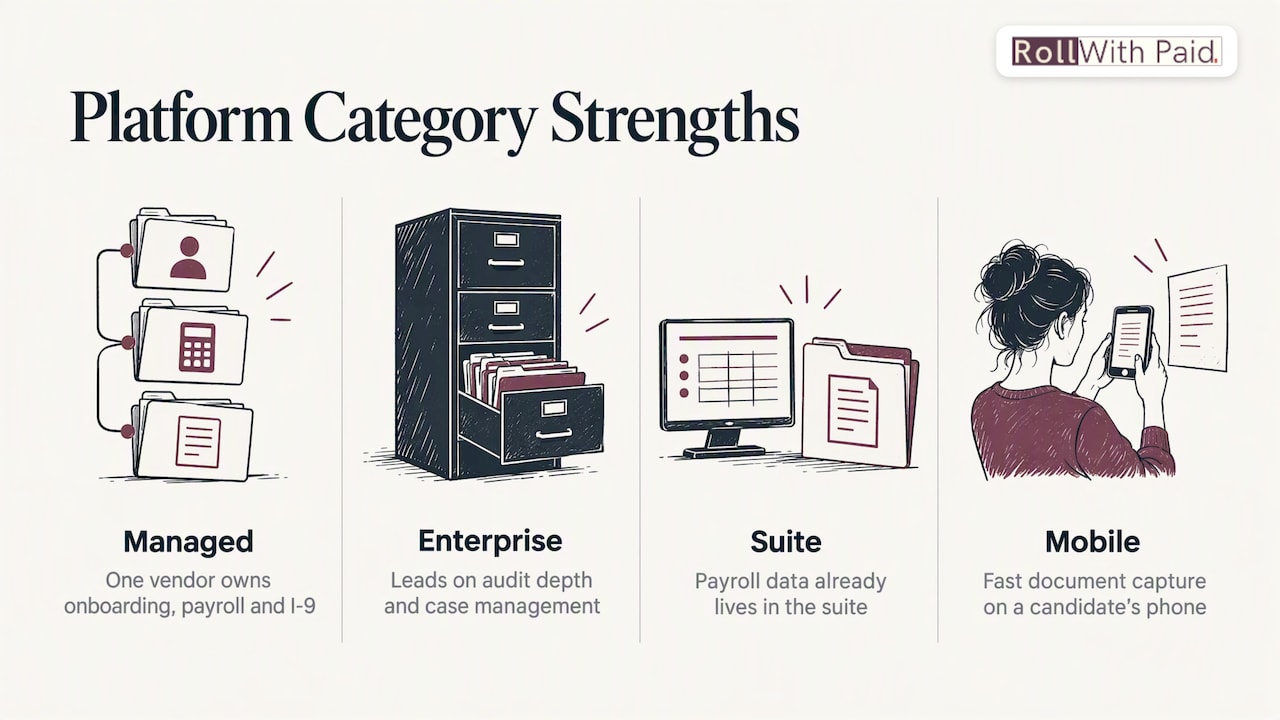
Where each category tends to lead. Managed partners usually lead on accountability, because one vendor owns onboarding, payroll and the I-9 record together. Enterprise platforms usually lead on audit depth and case management. Suite modules lead on integration, since the data already lives in payroll. Mobile apps lead on speed of document capture for a candidate holding a phone.
No software is government-certified, and you remain responsible for compliance. ICE guidance says to focus on whether a vendor provides a compliant audit trail that meets the 8 CFR 274a.2 requirements. Treat any “certified” claim with caution.
Pro Tip: Ask each vendor for an audit-log export, a sample Form I-9 showing the alternative procedure notation, and written proof of E-Verify enrollment before you sign anything.
If your payroll and I-9 data live in separate systems, read our note on the payroll software problem, because mismatched records are where integration gaps usually show up.
What must an I-9 system actually do to pass an inspection?
Several capabilities separate a compliant system from a digital filing cabinet.
Audit trail. An electronic I-9 system must create a permanent record of the date a form was accessed, who accessed it, and what action was taken whenever a form is created, completed, updated or corrected. ICE spells this out in its audit trail guidance. Storing an image of the form alone is not enough.
ICE states that an electronic I-9 system needs a permanent audit trail recording who accessed a record, when, and what they did, and that storing a digital image alone is insufficient. That single test eliminates many tools that only archive scanned forms.
Remote document examination. Employers enrolled in E-Verify in good standing may use the DHS alternative procedure, described in the E-Verify user manual. The steps from USCIS are:
- Examine clear copies of the front and back of each document.
- Hold a live video interaction with the employee.
- Keep clear copies of the documentation.
- Note on Form I-9 that the alternative procedure was used.
Apply it consistently at a hiring site, and know that employers may use an authorized representative, including a vendor, per the USCIS handbook. Our remote I-9 verification guide walks through how this works in practice.
E-Verify mismatch handling. When E-Verify returns a Tentative Nonconfirmation, the employer must notify the employee, and the employee then decides whether to contest it. The E-Verify FAQ sets the federal working-day windows and confirms you cannot take adverse action while the case is pending. Your system should generate the Further Action Notice and capture the employee’s acknowledgment.
Retention. Keep a Form I-9 for current employees. For former employees, USCIS retention guidance requires keeping it for three years after the date of hire or one year after employment ends, whichever is later. If you copy identity documents, retain those copies for the same period. Secure storage and fast retrieval for an inspection are the practical tests.
How should you evaluate vendors during a demo?
Work through these evaluation items in priority order, then use the script below.
- Audit log. Confirm a permanent record of who accessed or changed each form and when.
- E-Verify standing. Ask for proof of enrollment and good standing.
- Remote examination workflow. See the live video and notation steps performed, not described.
- Integrations. Check connections to your payroll, HRIS and applicant tracking systems.
- Data retention. Review the retention schedule and the process for purging records on time.
- User roles and permissions. Verify that access is limited by role and logged.
- Support and response time. Get written service levels for corrections and inspections.
Questions to ask in every demo:
- Can you export the audit log for a single employee right now?
- What is your written retention policy, and how do you dispose of records?
- How do you document the alternative procedure on Form I-9?
- Can you show proof of your E-Verify enrollment?
- How do you handle a Tentative Nonconfirmation from notice to resolution?
- Can we export all of our data if we leave?
- Who is liable for errors the system introduces?
- How fast do you respond during an inspection?
Pricing shapes. Expect one of a few models: a per-employee or per-hire fee, a module add-on to a payroll suite, a platform license, or a monthly service fee for a managed partner. Negotiate the trial period, implementation fees, add-on modules and the cost of data export. For our own costs, see our pricing page, where rates are set by worker classification and headcount.
Pro Tip: Require a written compliance attestation and a vendor-produced demo artifact, such as an audit-log export, before final approval.
How does our audit-ready approach work for high-risk employers?
Our core services include Employer of Record, payroll execution, HR and compliance solutions, and multi-state hiring support. We provide onboarding and payroll services, giving you one accountable partner instead of several systems to reconcile. We build every process to be audit-ready.
That model fits best for multi-state cannabis employers and others with high audit exposure. Read our I-9 and E-Verify compliance guide for cannabis employers for how we handle it.
Why managed beats point tools when risk is high
A point tool stores a form. It does not own the hiring decision, the payroll record or the correction when something goes wrong, and that gap is where penalties start. For employers under heavy scrutiny, I would rather have one accountable partner than three systems that each assume another is covering the risk. If you are not ready to change vendors, take one step this week: review recent Forms I-9 for errors and missing notations.
— Leah Kollross
Ready to run I-9s without the audit anxiety?
We take the compliance burden off your team so you can focus on running your business. Here is what we offer:
- Employer of Record services
- Payroll execution built for high-risk industries
- I-9 support and onboarding with audit-ready records
- HR and compliance solutions, plus multi-state hiring support
Your next step: see our pricing, read our guide on Employer of Record for high-risk industries, or book a conversation with our team.
FAQ
Can I-9 verification be done remotely?
Yes, under a DHS alternative procedure for employers enrolled in E-Verify in good standing. It requires a live video interaction, clear copies of each document, and a notation on Form I-9, as USCIS describes.
What should the best I-9 software include?
At minimum, a permanent audit trail, E-Verify support, a compliant remote examination workflow and secure retention. ICE notes that no software is government-certified, so test these capabilities yourself.
Does I-9 software reduce fraud and errors?
It can help. GAO notes that identity fraud remains a persistent challenge and that I-9 software can deter fraud through guided workflows and document-verification tools. Fewer manual errors also mean fewer mismatches.
What happens after an E-Verify mismatch?
You notify the employee right away, give them the Further Action Notice, and wait for their decision. You cannot take adverse action while the case is pending, and E-Verify guidance sets the federal working-day windows.
Sources
- E-verify
- Remote Examination of Documents (Optional Alternative Procedure to Physical Document Examination) | USCIS
- Form I-9 Inspection Under Immigration and Nationality Act § 274A | ICE
- Gao
Recommended
- I-9 and E-Verify: A Compliance Guide for Cannabis Employers
- I-9 & 280E for Cannabis: Roll With Paid vs. PeopleGuru in 1–2 Pay Cycles
- Roll With Paid. vs Green Leaf Business Solutions
Roll With Paid. is not a law firm and does not provide legal advice. This article summarizes Minnesota law as of August 2026 and is general information only. Tip arrangements are fact-specific; before changing a policy, consult employment counsel or contact DLI Labor Standards at 651-284-5075.