
HR First Incident Reporting Software for Cannabis Employers
For most cannabis operators and other high-risk employers, the right pick is an incident-to-claim platform that plugs directly into payroll and HRIS, or a managed Employer of Record with reporting built into onboarding. Either way, three things are non-negotiable: automated OSHA form generation, mobile intake, and payroll-linked claims. Roll With Paid. is a direct managed option worth evaluating if you want compliance handled rather than administered in-house.
TL;DR:
- A unified payroll-integrated incident reporting platform reduces manual data entry and ensures injury data flows directly into OSHA forms, workers’ compensation, and payroll adjustments.
- Managed Employer of Record services delegate all compliance tasks, including OSHA recordkeeping and claims filing, to a third party, eliminating the need for in-house safety teams.
- Configurable enterprise platforms are ideal for larger organizations with safety or HR teams, offering customizable workflows, root-cause analysis, and direct HRIS integration.
- Mobile-first injury intake tools prioritize speed, allowing supervisors to log incidents in under two minutes with photos and witness details, though with limited automation capabilities.
- When evaluating vendors, focus on OSHA form auto-population, payroll data sync, evidence capture, privacy controls, investigation templates, and the ability to export logs, ensuring a seamless safety-to-payroll workflow.
Table of Contents
- What Is the Best Incident Reporting Software for HR Compliance?
- How Do You Evaluate Incident Reporting Vendors?
- Why HR-First Incident Reporting Beats Bolt-On Compliance Tools
- Ready to Evaluate Roll With Paid.? Here’s What to Bring
- Sources
- FAQ
What Is the Best Incident Reporting Software for HR Compliance?
The best incident reporting software for high-risk employers is not the one with the flashiest dashboard. It’s the one that keeps a single injury from becoming three separate paperwork problems. When a worker gets hurt on a cultivation line or in a dispensary back room, that one event needs to become an OSHA 301 entry, a workers’ comp first report, and a payroll adjustment, without anyone re-typing the same facts three times.
Three categories dominate this space, and each one fits a different kind of operator.
Managed EOR platforms hand the whole compliance burden to a third party. You report the incident, and the provider handles OSHA recordkeeping, workers’ comp filing, and the payroll implications (leave pay, modified duty, wage adjustments) as part of a broader employer-of-record relationship. This is the right fit for owners who don’t want to build or staff a compliance function at all.
Enterprise incident platforms give you configurable workflows, root-cause frameworks, and connectors into your existing HRIS. These suit larger multi-site operators who already have a safety or HR team and just need better software, not a new employer relationship. Sodales’ EHS platform, for example, links incident records directly to disability claims and return-to-work plans with automated regulatory-form generation.
Field-first mobile intake tools prioritize speed of capture over depth of workflow. They’re built for supervisors standing in a grow room or on a loading dock who need to log an injury in under two minutes, photos and witness names included. Workers’ comp software built around mobile-first FNOL falls here, along with dedicated intake apps that feed a separate claims system.
Here’s how the three stack up against the capabilities that actually matter for HR-focused reporting:
| Category | Best for | OSHA automation | Payroll/HRIS integration | Mobile intake | Investigation workflows | Deployment model |
|---|---|---|---|---|---|---|
| Roll With Paid. | Cannabis operators wanting compliance offloaded | Managed as part of service | Native, since payroll is the same provider | Included in intake process | Managed through EOR workflows | Managed service / EOR |
| Enterprise incident platforms | Multi-site operators with an existing HR/safety team | Configurable, often strong | Connector-based, varies by vendor | Usually available | Root-cause templates, customizable | SaaS |
| Field-first mobile intake tools | Fast-growing single-site operators needing quick capture | Limited, often manual export | Minimal or none | Core strength | Basic, if any | SaaS, standalone |
The tradeoff is control versus offload. A SaaS platform gives you more customization but leaves you responsible for mapping fields correctly and keeping OSHA logs current. A managed EOR model gives up some of that control in exchange for someone else owning the deadline risk, which matters more than it sounds when OSHA requires prompt notification soon after a fatality or serious injury, with specific short deadlines to meet regulatory compliance (https://www.osha.gov/laws-regs/regulations/standardnumber/1904/1904.39).
For an operator already running payroll through Roll With Paid., adding incident intake to that same relationship removes a handoff most software tools can’t touch: getting the injury data into payroll without anyone re-entering it.
How Do You Evaluate Incident Reporting Vendors?
Run every vendor through the same short list before you sit through a second demo. Most sales calls skip straight to features; you need to interrogate the plumbing first.
- OSHA automation. Does the system auto-populate Form 300, 300A, and 301, and does it handle electronic ITA submission for establishments that require it?
- Payroll/HRIS integration. Can it pull job classification and wage data automatically, or will someone be retyping pay rates during an investigation?
- Evidence capture. Photos, witness statements, and time-stamped entries, captured from a phone, not just a desktop form.
- Role-based access. Who can see a privacy case (an injury type OSHA lets you record without a name attached), and who can’t?
- Investigation templates. Root-cause frameworks that don’t require a safety degree to use correctly.
- Audit trail integrity. Time-stamped, unchangeable records that hold up if a claim is disputed or an OSHA inspector asks for records.
Bring these questions to the demo: How do you auto-populate OSHA 301 and submit to the ITA? How do you sync job class and wage data from payroll? What happens to a privacy case in your system? Can I export seven years of OSHA logs in one file? How long does onboarding actually take, start to finish? What’s the support model once we’re live, a ticket queue or a named contact?
For pilot success, track three numbers over 30 to 90 days: time from incident report to OSHA form completion, time from report to workers’ comp first notice of loss, and the number of manual re-entries your team makes per incident. Loop in your safety lead, payroll administrator, and whoever handles workers’ comp claims before you sign anything. A seamless safety-to-comp workflow only works if all three of those people are mapping the same data fields from day one.
Pro Tip: Ask for a read-only sync or a no-data-change trial import before committing. If a vendor can’t show you their system mapping your real payroll and OSHA fields without touching production data, that’s a mapping problem you’ll inherit later, not a hypothetical one.
Why HR-First Incident Reporting Beats Bolt-On Compliance Tools
Most advice on incident reporting software treats it as a safety problem: log the injury, fill out the form, move on. That framing misses where the actual cost sits. The expensive part of a workplace injury in a high-risk industry isn’t the OSHA paperwork. It’s the payroll error that follows: wrong wage base for the comp claim, a missed modified-duty adjustment, a classification code that was wrong before the injury even happened.
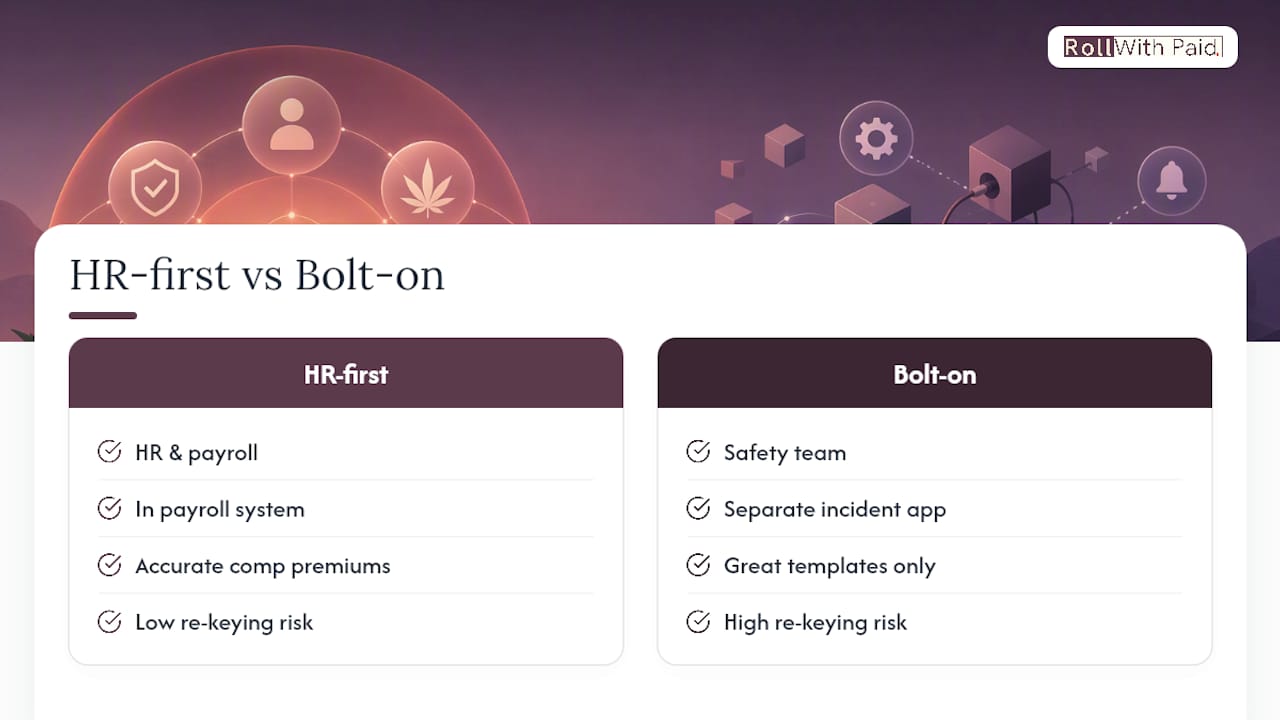
Treating incident reporting as an HR and payroll function, not a standalone safety module, fixes the actual failure point. Correct job classification drives both your comp premium and your claim accuracy, and that data lives in payroll, not in a separate incident app.
The reader takeaway: pick the integration first, features second. A platform with excellent investigation templates but no payroll connection still leaves someone re-keying data under deadline pressure, which is exactly when errors happen and disputes start.
— Leah
Ready to Evaluate Roll With Paid.? Here’s What to Bring
Rollwithpaid. is the alternative to piecing together separate safety software and a payroll vendor: one relationship handles the incident, the OSHA filing, and the payroll adjustment without a second system to reconcile. If you run a dispensary, cultivation site, or another high-risk operation, that single handoff is usually worth more than an extra dashboard feature.
Bring the same questions from your vendor checklist to a Rollwithpaid. discovery call: how incidents flow into OSHA forms, how job classification syncs with wage data, and what a privacy case looks like in practice. Rollwithpaid.’s Employer of Record model folds incident intake into the same service that already runs your payroll, which is worth asking about directly if you’re comparing it to a standalone platform. Pricing runs on a service rate with an optional HR retainer, and specifics depend on your worker classification codes and headcount, so ask for a quote scoped to your actual payroll. Start there, and bring your current OSHA logs to the call so the team can show you exactly how the handoff would work for your operation.
Sources
FAQ
What Makes Software OSHA-Compliant for Incident Reporting?
OSHA compliance means the system can auto-populate Forms 300, 300A, and 301 and meet the electronic ITA submission rules for establishments that require it. It should also follow the 7-day recording window and privacy-case rules under 29 CFR 1904.
Does Roll With Paid. Integrate Incident Reporting With Payroll?
Yes. Because Roll With Paid. runs payroll as part of its Employer of Record model, job classification and wage data connect directly to incident intake instead of living in a separate system.
How Much Does Incident Reporting Software Cost?
Costs vary widely by deployment model, from standalone SaaS subscriptions to managed services billed as part of payroll. Roll With Paid.’s pricing runs on a service rate with an optional HR retainer, scoped to your headcount and classification codes rather than a flat published rate.
Should a Cannabis Operator Choose a Managed EOR or a Standalone Platform?
A managed EOR fits owners who want compliance risk offloaded entirely, while a standalone platform suits operators with an existing HR or safety team that just needs better software. Cannabis operators facing complex multi-state and classification rules often lean toward a managed model to reduce filing risk.
What Should I Ask on an Incident Reporting Software Demo?
Ask how the vendor auto-populates OSHA 301 and submits to the ITA, how job class and wage data sync from payroll, and how privacy cases are handled. Request a read-only trial sync before committing, so you can see real field mapping without touching production data.
Recommended
- I-9 and E-Verify: A Compliance Guide for Cannabis Employers
- 5 Payroll Mistakes Cannabis Businesses Can’t Afford
- Workers’ Comp Classification Codes: Getting Them Right
Roll With Paid. is not a law firm and does not provide legal advice. This article summarizes Minnesota law as of August 2026 and is general information only. Tip arrangements are fact-specific; before changing a policy, consult employment counsel or contact DLI Labor Standards at 651-284-5075.