
Pick the Right Tier: Employee Handbook Software for Multi State Firms
For most HR teams, the best employee handbook software is a dedicated platform with location-aware policy filtering, digital acknowledgements, version control, and ongoing legal updates, not a static template. That combination is what actually lowers audit risk over time. Organization size and how many states you operate in should shift you toward a heavier or lighter tier. The shortlist and rollout checklist below will get you there.
TL;DR:
- Location-aware policy filtering is essential to automatically apply correct policies for employees based on their work location, especially in multi-state operations.
- Attorney-reviewed language must be updated regularly, ideally with clear logs, to ensure policies stay compliant amid changing laws.
- Signature capture and audit trails are non-negotiable for verifying employee acknowledgements and protecting against legal disputes.
- For growing or multi-state businesses, moving from templates to policy-management platforms is crucial to handle legal variations and reduce audit risks efficiently.
- Managed HR and payroll services offer comprehensive compliance support beyond documentation, ideal for high-risk or regulated industries with limited internal legal capacity.
Table of Contents
- How to Shortlist the Best Employee Handbook Software
- Key Features to Verify Before You Sign a Contract
- Validating Compliance and Multi-Jurisdiction Coverage
- What Employee Handbook Software Actually Costs
- Rolling Out a New Handbook and Tracking Acknowledgements
- Where a Managed HR Partner Fits In
- Questions to Ask Every Vendor Before You Buy
- Red Flags That Signal a Weak Handbook Platform
- Comparing the Main Categories at a Glance
- How Long Implementation Actually Takes
- Balancing Speed, Cost, and Compliance: An Honest Take
- Get Compliance Handled, Not Just Documented
- Sources
- FAQ
How to Shortlist the Best Employee Handbook Software
Not every business needs the same class of tool, and buying more than you need wastes budget just as fast as buying too little wastes protection. Four categories cover almost every employer, and each one fits a distinct stage of growth or risk exposure.
Template or one-off handbook builders sit at the entry level. Tools like Adobe Express’s handbook creator or Visme’s employee handbook creator give you polished layouts and a fast first draft. They’re the right call for a five-person shop with every employee working out of one office in one state. What they don’t do is track legal changes for you or apply different rules automatically when you hire across state lines. You’re the compliance engine, not the software.
SaaS handbook builders add the features that make a handbook a living document instead of a PDF that gets emailed once and forgotten. Expect live shareable links, built-in e-signature capture, and version history. HandbookHub, for example, markets itself as a searchable “official source of truth” with Slack integration and signature tracking baked in. This tier fits small-to-mid teams, roughly 20 to 200 employees, who need real acknowledgement records but aren’t juggling policy differences across a dozen jurisdictions.
Policy-management and location-aware platforms are built specifically for multi-state complexity. This is where BLR’s Employee Handbook Builder and Handbooks operate, both advertising attorney-reviewed policy language that adjusts automatically based on where an employee works. If you have staff in California, Colorado, and Texas, and your handbook currently handles that with three different Word documents, this is the tier that fixes it. It’s also the minimum bar for any employer facing regular audits or state labor department inquiries.
Managed or done-for-you HR and payroll services go further than software. They pair policy documentation with actual compliance execution: payroll filings, workers’ compensation classification, onboarding, and Employer of Record support. This is the right fit for regulated, high-risk, or multi-entity employers, cannabis operators being the clearest example, who need audit-ready documentation but don’t have the internal legal or HR bandwidth to manage it alone.
Here’s the quick self-check most buyers skip:
- One state, one entity, under 20 employees: template builder is probably enough.
- Growing team, one or two states, need acknowledgement tracking: SaaS handbook builder.
- Multiple states, frequent policy changes, internal HR team: policy-management platform.
- High-risk industry, multi-state payroll, limited internal compliance staff: managed service with integrated HR support.
Pick the tier that matches today’s headcount and jurisdiction count, not the one you might need in three years. You can always upgrade. What you can’t undo easily is a labor audit that catches a policy gap a location-aware platform would have flagged automatically.
Key Features to Verify Before You Sign a Contract
A sales demo will show you the polished version of a product. Your job is to poke at the parts that don’t get demoed by default, because that’s where compliance gaps hide.
Location-aware policy filtering should be the first thing you test, not the last. Ask the vendor to show you the same policy section, meal break rules, for instance, rendered for an employee in California versus one in Texas. If the platform can’t demonstrate that automatically, you’re looking at a document editor with a compliance label stapled on. This capability matters enough that SHRM’s partner product guidance treats location-aware filtering as a baseline requirement for regulated or multi-state employers, not a premium add-on.

Attorney-reviewed language and update cadence come next. Vendors love to say “attorney-reviewed” on their landing page. Ask them: reviewed by whom, how often, and what’s the process when a state passes a new paid sick leave law? BLR ties its review process to Jackson Lewis, a named law firm, which is the kind of specific answer you want. A vague “our legal team” answer with no update log should make you nervous.
Digital signature capture and audit trails are non-negotiable if you ever face a wrongful termination claim or a Department of Labor inquiry. You need more than “employee clicked accept.” You need a timestamped record showing which policy version they acknowledged, when, and from what device. Handbooks.io markets this combination of live links and signature tracking directly, and it’s worth asking any competing vendor to match it feature for feature.

Version control and live shareable links solve a problem most HR teams don’t notice until it bites them: the printed handbook from eighteen months ago that’s still floating around in a break room binder, directly contradicting the current online version. A live link means there’s exactly one current version, ever. When you update a policy, everyone who opens that link sees the update immediately, no reprinting, no confusion about which copy is “real.”
Searchability and integrations matter more for adoption than most buyers expect. A handbook nobody opens isn’t protecting you from anything. Platforms with Slack or Microsoft Teams integration, or single sign-on gating, tend to see far more actual usage than a PDF sitting in a shared drive. HandbookHub leans on this directly, and it’s a reasonable proxy question to ask any vendor: how do employees actually find and open this thing day to day?
AI-assisted drafting is showing up across nearly every builder now, and it genuinely speeds up first drafts. The catch is that AI-generated policy language still needs human legal review before it goes live. An AI tool can draft a remote work policy in minutes; it can also confidently generate language that conflicts with a state’s specific overtime rules if nobody checks it. Treat AI drafting as a speed tool for structure and phrasing, never as a substitute for the attorney review layer.
Pro Tip: During any demo, ask the vendor to pull up their own change log from the last 12 months. A platform that genuinely tracks legal updates will have a visible, dated history. One that can’t produce this on request is telling you something important.
Most employers underestimate how often policy language actually needs to move. Employers commonly revise their handbooks two to three times per year as state and local laws shift, which means a platform without automatic update tracking effectively hands that workload back to you, quietly, every few months.
Validating Compliance and Multi-Jurisdiction Coverage
“Location-aware” is a phrase every vendor uses and almost none define the same way. Operationally, it should mean the platform stores policy variants by state, and in some cases by city or county, and serves the correct variant based on where each employee is assigned to work, not where your headquarters sits. That distinction matters enormously for employers with remote staff scattered across multiple states, since the applicable rules follow the employee, not the payroll address.
Before signing anything, request these in writing:
- A sample multi-state comparison. Ask for the same policy section shown side by side for at least three states with meaningfully different rules, paid sick leave is a good test since requirements vary widely.
- Attorney-review documentation. Get the name of the reviewing firm or attorney, not just “legal team,” and ask how often policies are re-reviewed after a law change.
- An update log with dates. A real compliance platform can show you exactly when a policy last changed and why. If they can’t produce this, their “ongoing updates” claim is marketing, not process.
- Signature audit trail export. Confirm you can pull a report showing every employee’s acknowledgement status, timestamp, and policy version, exportable as a file you can hand to an auditor or attorney without vendor assistance.
- Data retention and export terms. Ask what happens to your acknowledgement records and policy history if you cancel. Some vendors purge data quickly after contract termination, which is a problem if a former employee’s claim surfaces years later.
A handful of red flags come up often enough that they’re worth naming directly. Watch for vendors who describe their content as “compliant” without naming who reviewed it. Watch for platforms that update templates on a fixed annual schedule regardless of when laws actually change mid-year. And watch for any tool that can’t produce a sample audit trail export during the sales process. If they can’t show it before you buy, don’t assume it’ll appear after.
Pro Tip: Ask specifically what happens when a new city ordinance passes, San Francisco and New York City both pass local employment rules more often than most states realize. A platform that only tracks state-level changes will miss these, and city-specific gaps are exactly what regulators check first in an audit.
What Employee Handbook Software Actually Costs
Pricing across this category breaks into a few recognizable shapes, and knowing which one you’re being quoted helps you compare offers that otherwise look nothing alike on paper.
- Per-employee or per-seat pricing scales with headcount and is common among SaaS handbook builders and policy-management platforms; it rewards you for staying lean but can climb fast during rapid hiring.
- Flat per-handbook pricing charges a set fee regardless of headcount, more typical of template tools and one-off builders, and works best for stable, single-location employers.
- One-time template purchases are the cheapest entry point but usually exclude ongoing updates entirely; you’re paying for a snapshot, not a subscription to accuracy.
- Tiered SaaS plans bundle features like e-signatures, integrations, and multi-state support into higher tiers, which is where policy-management platforms tend to land.
The quoted price rarely tells the whole story. Ask directly about state add-on fees, since many multi-state platforms charge per additional state covered. Ask whether attorney review is included or billed separately for custom policy language. And ask about implementation or migration fees if you’re moving from an existing handbook, some vendors quote a low subscription price and then bill heavily for the setup work behind it.
Frame the return on investment in terms your finance team will actually respect: reduced time spent preparing for audits, fewer legal exposure hours if a policy dispute arises, and measurably higher acknowledgement completion rates compared to a PDF-and-email process. A platform that costs more per month but cuts your HR team’s audit prep from two weeks to two days is not the expensive option, it’s the cheaper one once you account for labor hours.
Before signing, get clear answers on three procurement questions: who owns the policy content and data if you cancel, what format your acknowledgement records export in, and what the actual cancellation notice period is. Vendors are generally straightforward about pricing tiers and evasive about exit terms, which tells you where to focus your questions.
Rolling Out a New Handbook and Tracking Acknowledgements
Buying the software is the easy part. Getting every employee to actually read and sign the thing is where most rollouts stall.
- Lock the version before launch. Finalize legal review, freeze the document, and confirm the version number that will go live so nobody is comparing notes on outdated drafts.
- Brief managers first. Give supervisors a short walkthrough before the company-wide announcement so they can answer questions instead of forwarding confused employees to HR.
- Launch through a gated live link. Use single sign-on or a login-gated link rather than a plain email attachment; this is what makes signature tracking reliable.
- Set automated reminders. Most platforms support reminder sequences for employees who haven’t acknowledged within a set window, typically 7 to 14 days.
- Escalate non-responders manually. After automated reminders lapse, route the remaining names to direct managers for a personal follow-up, and log every step.
- Export the audit trail. Once acknowledgement rates plateau, pull the full report and file it, this is the record you want on hand before anyone asks for it.
Track adoption the same way you’d track any compliance metric: percentage acknowledged within the first week, percentage still outstanding after 30 days, and the exact date of the last full policy update. Handbooks with visible version history and live links consistently show faster acknowledgement completion than static PDFs, largely because employees trust that the link they’re clicking holds the current, correct document.
Where a Managed HR Partner Fits In
Software solves the document problem. It doesn’t solve the compliance execution problem underneath it, and for employers in regulated industries, that gap is where real exposure lives.
Rollwithpaid specializes in payroll and HR solutions built specifically for high-risk industries, with particular depth in cannabis operations, where compliance requirements shift constantly and margin for error is thin. A handbook platform can tell you which sick leave policy applies in a given state. It can’t file your payroll taxes correctly across multiple jurisdictions, classify your workers’ compensation codes accurately, or catch the audit gap a labor department examiner will flag six months from now.
That’s the layer Rollwithpaid operates in. Through a comprehensive Employer of Record model, the company keeps clients audit-ready and secure, handling the parts of compliance that sit beyond what any handbook document can cover alone. Clients working with Rollwithpaid have experienced zero late filings, a direct measure of the kind of consistency that regulated employers can’t afford to gamble on.
The onboarding experience matters just as much as the compliance backbone. Rollwithpaid provides streamlined onboarding and personalized support, which means new hires get set up correctly the first time instead of generating cleanup work weeks later.
If your business sits in a high-risk category, cannabis cultivation, dispensary operations, or any multi-entity structure with regulatory exposure, and your internal team doesn’t have dedicated HR or legal capacity, a managed partner is usually the more reliable path than stacking software subscriptions and hoping they cover every gap. Handbook software handles the document. A partner like Rollwithpaid handles what happens after someone signs it.
Questions to Ask Every Vendor Before You Buy
Vendors will answer the questions you ask, not the ones you should have asked. A short, direct list during the sales call saves you from discovering gaps after you’ve signed a contract.
Start with ownership: who owns the policy content, and what happens to your document and signature history if you cancel? Follow with review specifics: which law firm or attorney reviews the content, and how often? Ask about update mechanics directly, does a new law trigger an automatic policy update, or does someone have to manually request it? Confirm integration depth: does the platform genuinely connect to your existing HRIS or single sign-on system, or is that feature listed but not yet built? And ask about support response times in writing, not just during the sales pitch, since post-purchase support quality tends to diverge sharply from pre-purchase promises.
One question that trips up more vendors than it should: can you show me a real acknowledgement report from an existing client, redacted for privacy? A platform confident in its audit trail will produce this without hesitation. One that stalls or offers only a mockup screenshot is telling you the feature is thinner than the marketing page suggests.
Finally, ask what happens during a state or federal audit. Does the vendor provide any support pulling records, or are you entirely on your own once the request lands? The answer tells you whether you’re buying a document tool or a genuine compliance partner.
Red Flags That Signal a Weak Handbook Platform
A few warning signs show up repeatedly across this category, and each one is worth treating as a dealbreaker rather than a minor concern.
Vague compliance language is the biggest one. “Fully compliant” or “legally sound” with no named reviewing attorney or law firm attached is a marketing claim, not a legal guarantee. Static annual updates are another warning sign: if a platform only refreshes policy content once a year regardless of when laws actually change, you’re carrying the compliance gap for months at a time. Watch for locked-in contracts with no clear data export path, since losing access to your own acknowledgement history during a dispute is a genuinely damaging position to be in.
Be equally cautious of platforms that oversell AI drafting without mentioning human legal review anywhere in their process. Fast drafts are useful; unreviewed legal language distributed company-wide is a liability. And be wary of any vendor who can’t produce a sample audit export during the sales process, that’s the exact document you’ll need most urgently if an inquiry ever lands on your desk.
Comparing the Main Categories at a Glance
| Solution class | Strongest for | Main limitation |
|---|---|---|
| Template/one-off builders | Single-location microbusinesses | No ongoing legal updates or location filtering |
| SaaS handbook builders | Small-to-mid teams, 1 to 2 states | Limited depth for complex multi-state rules |
| Policy-management platforms | Multi-state or enterprise employers | Higher cost, steeper setup |
| Managed HR/payroll services | Regulated, high-risk, multi-entity employers | Requires a service relationship, not just software |
Template tools like Adobe Express and Visme win on speed and design polish, but they don’t substitute for location-aware legal language or ongoing attorney-reviewed updates. Policy-management platforms like BLR and Handbooks.io close that gap directly for multi-state employers, at a meaningfully higher price point than a template purchase. Managed services extend coverage furthest, pairing documentation with actual compliance execution, which matters most for employers who don’t have in-house legal or HR depth to lean on.
How Long Implementation Actually Takes
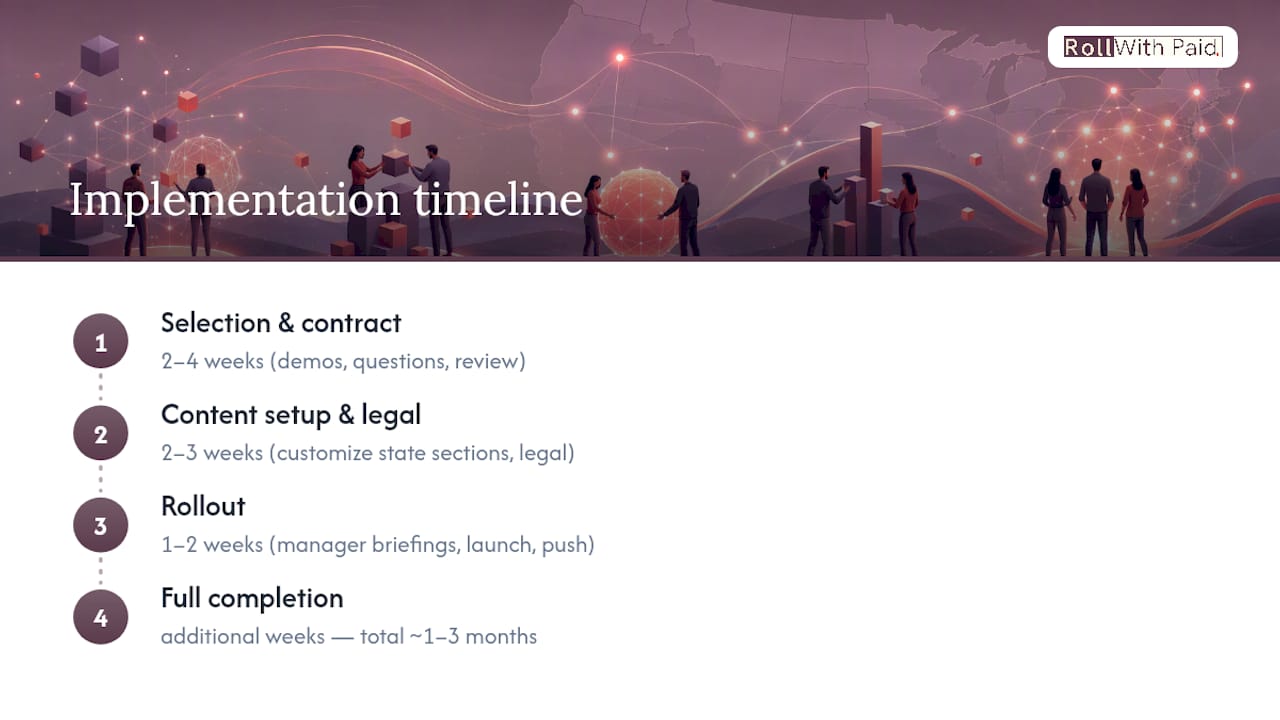
Most employers underestimate the calendar time between choosing a platform and having a fully signed, live handbook. Selection itself, demos, vendor questions, contract review, typically runs two to four weeks for a mid-sized employer. Initial content setup, including customizing state-specific sections and running the draft through legal review, usually takes another two to three weeks depending on how many jurisdictions you’re covering.
Rollout adds another one to two weeks: manager briefings, the launch announcement, and the initial acknowledgement push. Full completion, meaning every current employee has signed off, typically stretches additional weeks beyond launch as reminders and manager follow-ups clear out stragglers. Add it together and most employers land somewhere between about one and three months from first vendor call to a fully acknowledged handbook, longer for organizations spanning many states or with layered internal approval processes.
Budget for that timeline honestly. Rushing legal review to hit an arbitrary launch date is exactly the kind of shortcut that creates the audit gaps this whole category exists to prevent.
Balancing Speed, Cost, and Compliance: An Honest Take
The trade-off nobody states plainly enough: cheaper and faster handbook tools shift compliance risk onto you, not away from it. A $200 template purchase feels like a win in the moment, until you’re the one manually tracking which of your five states changed its paid leave law last quarter.
Watching this category from the outside, the pattern is consistent. DIY templates work fine until headcount or jurisdiction count grows past what one HR person can track manually. SaaS builders solve the acknowledgement and version problem well but still assume you have someone competent reviewing legal content. Managed services cost more upfront and give up some direct control, but they transfer the ongoing compliance burden to people whose full-time job is tracking it.
There’s no universally correct answer here, only a correct answer for your current size, jurisdiction count, and internal capacity. The mistake is picking based on price alone rather than on what happens six months after signup, when a law changes and someone has to notice.
One concrete step worth taking this week: pull your current handbook, count how many states or cities it needs to account for, and check the date of its last substantive legal review. That single audit will tell you more about which tier you need than any vendor pitch will.
— Leah
Get Compliance Handled, Not Just Documented
A handbook platform can tell you what the policy should say. It can’t file your payroll taxes on time across five states, classify your workers’ comp codes correctly, or stand between you and a labor audit. That’s the gap Rollwithpaid closes for employers in high-risk industries, especially cannabis operators, where the compliance burden runs far deeper than a document.
A comprehensive Employer of Record model helps keep clients audit-ready across multi-state payroll, workers’ compensation, and regulatory filings, aiming for timely compliance. Onboarding is handled with support designed to help new hires and new policies implement correctly, reducing the need for later cleanup work. If your handbook needs are one part of a larger compliance load, including worker classifications, multi-state payroll, or a fast-changing regulatory environment, a managed partner can address more compliance issues than software alone.
Start by reading through 5 payroll mistakes cannabis businesses can’t afford to see where the exposure typically hides, then reach out to Rollwithpaid to book a consult and find out what a fully managed compliance setup would look like for your business.
Sources
A few resources are worth keeping open in a browser tab while you evaluate vendors. Handbooks.io is a direct example of a platform combining attorney-reviewed content with live links and signature capture, useful as a feature benchmark. BLR’s Employee Handbook Builder documents its attorney-review partnership publicly, which is the kind of transparency worth demanding from any competing vendor. SHRM’s partner product guidance offers a neutral, third-party framing of what location-aware compliance actually requires, useful for validating any vendor’s claims against an independent standard.
FAQ
What is the best software to create employee handbooks?
There’s no single best option for every employer. Location-aware policy-management platforms like Handbooks.io or BLR suit multi-state and regulated employers, while SaaS builders fit small teams, and managed services like Rollwithpaid fit high-risk industries needing full compliance support beyond documentation alone.
What company has the best employee handbook?
No independent, verified ranking of “best” employee handbooks exists publicly. What matters more is whether a company’s handbook is attorney-reviewed, updated regularly, and tracked with a documented signature audit trail, not which brand’s handbook looks the most polished.
What are the top employee management software options?
Employee management software spans HRIS platforms, handbook builders, payroll systems, and compliance tools, and the strongest choice depends on your specific need. For handbook management specifically, policy-management platforms with location-aware filtering and attorney review represent the more compliance-focused tier, while managed HR and payroll partners like Rollwithpaid cover the broader administrative burden for regulated employers.
Are employee handbooks outdated?
No, but static PDF handbooks are increasingly outdated as a format. Employers typically revise handbook content two to three times per year as laws shift, and platforms with live links, version history, and searchability replace the printed handbook far more effectively than a document distributed once and never revisited.
How long does it take to fully roll out a new employee handbook?
Most employers need six to twelve weeks from vendor selection to a fully acknowledged handbook, covering legal review, launch, and reminder cycles for non-responders. Multi-state employers with more jurisdictions to account for typically land at the longer end of that range.
Recommended
Roll With Paid. is not a law firm and does not provide legal advice. This article summarizes Minnesota law as of August 2026 and is general information only. Tip arrangements are fact-specific; before changing a policy, consult employment counsel or contact DLI Labor Standards at 651-284-5075.