
Stop Payroll Errors: Choose PTO Tracking Software by Use Case for HR
If you run a small HR team, start with a dedicated leave tracker built for simplicity. If payroll accuracy and audit trails matter most, prioritize a full HRMS with native payroll sync. If your workforce is mostly deskless or mobile, look for a mobile-first app with Slack or Microsoft Teams integration before anything else.
TL;DR:
- Smaller HR teams should choose a simple, dedicated leave tracker unless payroll complexity or multi-state policies require a full HRMS with native payroll sync.
- For organizations with in-house payroll, a full HRMS that integrates directly with payroll reduces reconciliation errors and streamlines balance management.
- Businesses in regulated or high-risk industries must prioritize payroll accuracy, considering managed Employer of Record services over standalone software for compliance reasons.
- Mobile-first PTO apps with Slack or Teams integration are essential for deskless and remote teams to ensure request and approval processes are frictionless.
- Manual tracking via spreadsheets or free tools becomes a liability once payroll reconciliation or multi-state accrual rules exceed simple configurations, making dedicated software essential.
Table of Contents
- Best PTO Tracking Software by Use Case
- Must-Have PTO Tracking Features and the Trade-Offs Behind Them
- How to Choose: A Decision Checklist and Exact Vendor-Demo Questions
- Implementation and Payroll Integration: Timelines and Reconciliation
- PTO Software Pricing: What to Budget and What Vendors Don’t Advertise
- Compliance and Recordkeeping: The PTO Pitfalls That Trigger Disputes
- Free and Low-Cost PTO Tools: When They Work and When They Become a Liability
- Why Payroll Accuracy Should Drive Your PTO Software Decision
- How Rollwithpaid Handles PTO Records for High-Risk Payroll
- Resources for Evaluating PTO Tracking Software
- Sources
- FAQ
Best PTO Tracking Software by Use Case
There’s no single best PTO tracking software for every organization, because the right category depends on team structure, payroll complexity, and how distributed your workforce is. A company running payroll in-house with 40 employees across three states has entirely different needs than a five-person startup tracking vacation days on a shared calendar. The category matters more than the brand name.
Here’s how buyer profiles map to solution types, and why each match makes sense.
Small businesses and lean HR teams (under 50 employees). A dedicated, standalone PTO tracker beats a full HRMS suite here. You don’t need performance reviews or applicant tracking bundled in. You need accrual rules, a request/approval flow, and a shared calendar that doesn’t require a training session to operate. Standalone tools also tend to deploy faster since there’s no broader HR data migration involved.
Mid-size companies running payroll in-house. This is where a full HRMS with native payroll sync earns its cost. BambooHR’s time-off feature, for example, bundles self-service balance lookups, a shared “Who’s Out” calendar, and payroll integration into one system, which reduces the double-entry that causes reconciliation headaches at month-end.
Enterprise organizations with multi-state or multi-entity payroll. Complexity multiplies fast once you’re managing different accrual rules by state, entity, or union contract. Enterprise buyers should prioritize configurable policy engines over ease-of-use, because a system that can’t handle California’s accrual carryover rules alongside a different state’s use-it-or-lose-it policy will create manual workarounds that defeat the purpose of automating in the first place.
Deskless and field teams (retail, hospitality, cultivation, manufacturing). Mobile UX outranks almost everything else for this group. Field and hourly workers prioritize fast, frictionless requests and instant approvals over granular policy configuration, and a system that requires logging into a desktop portal will simply go unused. Look for push notifications, one-tap approvals, and calendar visibility that supervisors can check from a phone between shifts.
Distributed and remote-first teams. Slack and Microsoft Teams integration isn’t a nice-to-have here. It’s the difference between a system employees actually check and one they forget exists. A distributed team wants PTO requests and approvals to happen inside the tool they already live in all day, not in a separate portal they visit twice a year.
Payroll-first, compliance-sensitive employers. If you operate in a regulated or high-risk industry, treat payroll sync as a mission-critical feature rather than a convenience. Native payroll connectors reduce manual reconciliation error, and if your internal team can’t guarantee that level of accuracy, a managed payroll partner may be the safer route than any software purchase alone.
A few integration and deployment considerations apply across every profile:
- Confirm whether the tool syncs natively with your payroll provider or requires CSV exports.
- Check whether approval workflows support multiple approval levels if you have layered management structures.
- Verify mobile app parity. Some tools have a full-featured web app but a stripped-down mobile version.
- Ask how the tool handles blackout dates or seasonal coverage restrictions if your industry has predictable staffing crunches.
When to upgrade categories: if you’re manually re-entering PTO hours into payroll more than once a pay period, that’s a signal to move from a standalone tracker to an HRMS with native sync. If your spreadsheet or freemium tool can’t enforce different accrual rates by tenure or location, that’s the cue to move up to a configurable policy engine.
Must-Have PTO Tracking Features and the Trade-Offs Behind Them
Every credible PTO tracking system needs to nail five functional areas: accrual engines, approval workflows, shared calendars, payroll sync, and reporting. Leave-management platforms typically bundle configurable leave types, automated accrual rules, multi-level approval workflows, and exportable reports as their core feature set. The differences between vendors show up in how deep each of these goes, not whether they exist at all.
Accrual engines calculate how PTO builds over time, whether that’s a flat monthly rate, a tenure-based tier system, or a rolling accrual tied to hours worked. The trade-off here is real: a flexible policy engine that can model any accrual scenario is powerful, but it’s also harder to configure correctly, and a misconfigured accrual rule can silently miscalculate balances for months before anyone notices.
Approval workflows route requests to the right manager, and in layered organizations, to a second or third approver. Simple tools offer single-approver flows. More configurable systems support conditional routing, like escalating to HR automatically if a manager doesn’t respond within 48 hours.
Shared calendars give managers visibility into who’s out and when, which matters most for teams juggling overlapping coverage needs. This feature is fairly standardized across the category, but integration with existing calendar tools (Google Calendar, Outlook) varies in quality.
Payroll sync is where the biggest trade-off lives. Standalone leave trackers are often faster to implement but may lean on manual reconciliation if payroll integration is limited, while full HRMS platforms take longer to set up but deliver tighter payroll integration that pays off over time. If you’re choosing between a quick standalone deployment and a slower, deeper HRMS rollout, the right answer depends on how much manual reconciliation your team can absorb without errors creeping in.
Reporting and mobile access round out the checklist. Reporting should let you export PTO liability by department, flag negative balances, and support audit requests without a spreadsheet rebuild. Mobile access should mirror desktop functionality, not just offer a stripped-down request form.
Security deserves its own line item. Ask vendors directly how PTO and payroll data are encrypted at rest and in transit, and whether the platform supports role-based access so only authorized staff can see compensation-linked balances.
Here’s the core trade-off tension to keep in mind while comparing systems:
- Flexible policy engines handle complex accrual rules well but take longer to configure correctly.
- Simple, opinionated tools are easier to roll out but may force workarounds once your policies get more complex.
- Native payroll sync reduces reconciliation errors but usually costs more and takes longer to implement.
- CSV export workflows are cheaper and faster to set up but shift the reconciliation burden onto your team every pay cycle.
Pro Tip: Before signing anything, ask the vendor for a sandbox environment and run your messiest real-world accrual scenario through it, like a mid-year hire with a tenure-based accrual bump. If the system can’t calculate that correctly in a test environment, it won’t calculate it correctly in production either.
How to Choose: A Decision Checklist and Exact Vendor-Demo Questions
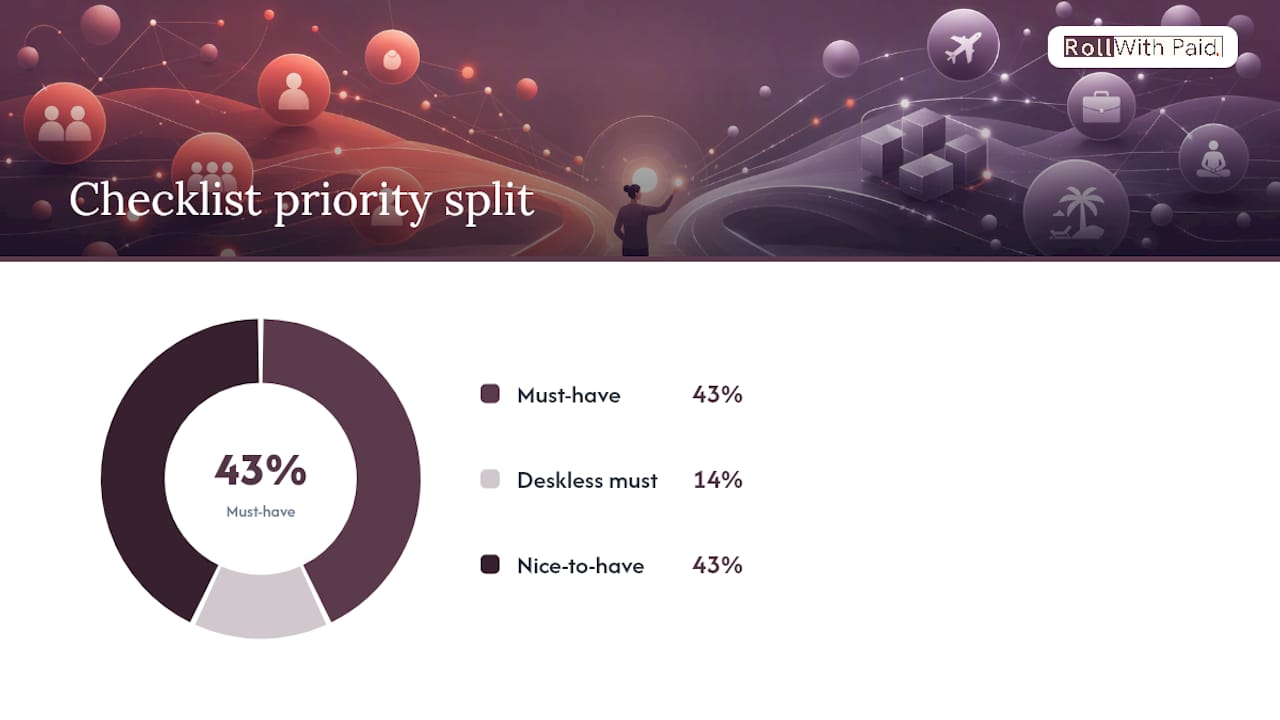
Choosing the right PTO tracking software comes down to running vendors through a consistent scoring framework rather than getting swayed by whichever demo had the slickest interface. Here’s the checklist to work from, in priority order.
- Payroll integration depth (must-have). Does the system connect natively to your payroll provider, or does it require manual CSV uploads? Native sync should be non-negotiable if payroll accuracy carries compliance weight for your business.
- Multi-policy support (must-have). Can it handle different accrual rules by state, department, or employee classification simultaneously? Test this with your most complex real scenario, not a generic example.
- Audit trail and timestamped approvals (must-have). Every request and approval needs a permanent, timestamped record you can produce during a wage-and-hour audit.
- Mobile experience (must-have for deskless teams, nice-to-have otherwise). If your workforce is field-based, weight this heavily. If everyone works at a desk, it matters less.
- Reporting and export flexibility (nice-to-have, but close to must-have). Can you pull a PTO liability report by department without support intervention?
- Chat-tool integration (nice-to-have unless distributed). Slack or Teams integration matters far more for remote-first teams than co-located ones.
- Implementation support and timeline (nice-to-have). Ask what’s included versus billed separately as a consulting add-on.
- Contract flexibility (nice-to-have). Month-to-month options reduce risk if the tool doesn’t scale with you.
When you get vendors on a demo call, ask these questions directly instead of letting them run a generic script:
- “Walk me through exactly how your system syncs with [your specific payroll provider], and what happens if that sync fails mid-cycle.”
- “What’s your SLA for payroll sync errors, and who’s responsible for catching a discrepancy before payroll runs?”
- “Can I export all historical PTO data if we ever migrate off your platform, and in what format?”
- “How do you handle an employee who works in two states with two different accrual policies?”
- “What does your backup and disaster recovery process look like for leave records?”
Use a simple 0 to 3 scoring rubric for each demo: 0 means the vendor couldn’t answer or the feature doesn’t exist, 1 means it exists but requires a workaround, 2 means it works but needs configuration help, and 3 means it works out of the box exactly as described. Anything scoring a 0 or 1 on a must-have criterion should eliminate the vendor from your shortlist, regardless of how good the rest of the demo looked.
Watch for red flags during the process: vagueness about payroll sync mechanics, reluctance to provide a sandbox environment, or an inability to explain what happens when a sync fails. A vendor that can’t answer failure-mode questions confidently is telling you something about how often failures happen.
Implementation and Payroll Integration: Timelines and Reconciliation
A realistic implementation timeline for a standalone PTO tracker runs two to four weeks, while a full HRMS with payroll sync typically takes six to twelve weeks depending on how many payroll rules need mapping. HR should own policy configuration and testing; IT or a payroll administrator should own the technical connector setup and final validation before go-live.
Three integration patterns dominate the market, each with a distinct trade-off. A native connector links directly to your payroll system and updates balances automatically, which is the gold standard for accuracy but requires vendor compatibility with your specific payroll platform. An HRIS sync routes PTO data through a broader HR system that then feeds payroll, adding a layer but often smoothing out format mismatches. A CSV export workflow is the fallback when no direct integration exists, and it works, but it shifts the reconciliation burden onto a human every single pay period.
Before running your first live payroll with new PTO data, walk through this validation checklist:
- Run a parallel test cycle where old and new systems calculate the same employee’s balance independently, then compare results.
- Confirm negative balance handling matches your policy (does the system block requests or just flag them?).
- Verify that terminated employees’ accrued-but-unused PTO calculates correctly for final paycheck purposes.
- Check that mid-cycle hires and rehires accrue from the correct start date.
- Test how the system handles a leave request that spans a pay period boundary.
Reduced compliance risk and reclaimed admin hours are the primary reasons organizations move off spreadsheets toward dedicated leave software in the first place, but that benefit only materializes if the integration is validated before go-live, not discovered as broken after the first payroll run.
For businesses in high-risk or heavily regulated industries, this is exactly where a managed payroll partner reduces risk that software alone can’t eliminate. Software can calculate a balance correctly; it can’t take legal responsibility for a filing error or a misclassified worker.
PTO Software Pricing: What to Budget and What Vendors Don’t Advertise
Pricing for PTO tracking software generally falls into per-employee-per-month bands, though the exact range varies by feature depth and whether payroll sync is bundled or sold separately. Standalone leave trackers tend to sit at the lower end of the market, while full HRMS platforms with time-off modules cost more but fold in a broader feature set.
Three pricing models show up most often:
- Per-employee-per-month (PEPM), which scales predictably as headcount grows but can get expensive fast for larger teams.
- Flat-tier pricing based on employee count bands (for example, a fixed price for up to 50 employees), which is easier to budget but can create a cost cliff when you cross a tier threshold.
- Freemium with paid upgrades, common among standalone trackers, where core scheduling is free but payroll sync and advanced reporting sit behind a paywall.
Hidden costs catch a lot of buyers off guard. Implementation and consulting fees for HRMS platforms are frequently quoted separately from the subscription price. Advanced reporting modules, API access, and premium integrations often carry add-on fees that don’t show up on the initial pricing page. Some vendors also charge extra for historical data migration if you’re switching from a legacy system or spreadsheet.
To calculate a realistic ROI, weigh the subscription cost against two concrete savings categories: admin hours reclaimed from manual tracking, and the cost of payroll corrections avoided. If your HR team currently spends several hours a week reconciling spreadsheet-based PTO against payroll, that time has a dollar value, and it’s the clearest, most defensible number to bring into a budget conversation. A pricing comparison that accounts for both subscription cost and admin time saved gives a far more accurate picture than subscription price alone.
Compliance and Recordkeeping: The PTO Pitfalls That Trigger Disputes
An unreliable audit trail is the single biggest compliance risk hiding inside PTO tracking, because most disputes come down to one question: can you prove exactly when a request was submitted, approved, and by whom? Timestamped, immutable approval records settle these disputes before they escalate into a wage claim or an audit finding.
Most PTO disputes trace back to a handful of recurring causes, and each one has a software-side fix:
- Ambiguous accrual timing (does PTO accrue at hire, after a probationary period, or retroactively?) gets resolved by configuring the exact accrual trigger date in the system rather than relying on manual tracking.
- Manager-level miscommunication about verbal approvals disappears once every request routes through a system that logs the approval electronically.
- Balance discrepancies at termination get prevented by running a final-balance validation report before issuing a last paycheck.
- Inconsistent policy application across departments shrinks dramatically once accrual rules are centralized in one configurable system instead of managed ad hoc by individual managers.
For recordkeeping, export and retain PTO records on a schedule that matches your state’s wage-and-hour recordkeeping requirements, and don’t rely solely on the vendor’s cloud storage as your only backup. If a state auditor or a former employee’s attorney requests records going back several years, you want a local export you control, not just a login credential to a system you might switch away from later.
Pro Tip: Set a recurring calendar reminder to export a full PTO ledger quarterly, even if your software promises unlimited historical access. Vendors get acquired, platforms sunset, and “unlimited” access has a way of becoming “for the length of your active subscription” in the fine print.
Free and Low-Cost PTO Tools: When They Work and When They Become a Liability
Spreadsheets and free tools work fine for very small teams with simple, uniform accrual policies and no multi-state complexity. The moment you add a second location, a union contract, or more than a handful of managers approving requests, the manual coordination required to keep a spreadsheet accurate starts costing more in admin hours than a paid tool would.
Freemium leave trackers exist and can genuinely scale to sizable teams, but freemium plans commonly lack payroll sync and advanced reporting, which are exactly the features that matter most once your business starts caring about audit readiness. Free tiers are a reasonable starting point for a five-person company; they become a liability once payroll accuracy or compliance recordkeeping enters the picture.
Before migrating off a spreadsheet or free tool, run through this checklist:
- Export every historical PTO record in a format you can re-import elsewhere.
- Document your current accrual rules in plain language before configuring them in new software, so nothing gets lost in translation.
- Run a parallel tracking period, old system and new system side by side, before fully cutting over.
- Confirm every employee’s current balance is verified and signed off by a manager before go-live, to avoid disputes about “starting balance” later.
Why Payroll Accuracy Should Drive Your PTO Software Decision
Working with employers in regulated and high-risk industries changes how you think about PTO tracking software, because the stakes of a reconciliation error aren’t just an annoyed employee. They’re a compliance exposure. The employers I’d trust to make a smart call here aren’t the ones chasing the flashiest interface. They’re the ones asking vendors uncomfortable questions about sync failures before signing anything.
If payroll accuracy is mission-critical for your business, prioritize native payroll connectors or plan for a managed partner to own reconciliation entirely. Software can calculate a balance. It can’t stand in front of a regulator on your behalf. Raise your selection bar accordingly, especially if you operate in an industry where HR compliance carries elevated risk.
— Leah
How Rollwithpaid Handles PTO Records for High-Risk Payroll
One option for employers who want more than just a software connector for audit readiness is a managed Employer of Record service. Instead of evaluating payroll sync SLAs and reconciliation checklists yourself, a managed Employer of Record model builds PTO tracking directly into payroll execution, with the accrual, approval, and audit trail handled as part of one accountable service rather than two separate systems you have to keep in sync.
This approach fits multi-state operators and high-risk industry employers, especially cannabis businesses, where compliance missteps carry outsized legal and financial consequences. An Employer of Record model that manages payroll processing, HR compliance, and workers’ compensation together can remove the reconciliation gap that standalone PTO software can leave behind. If your business runs payroll across multiple states or operates in a sector where regulators scrutinize every filing, learn how the Employer of Record model works for high-risk industries and get a clear picture of what a managed partnership actually replaces.
Resources for Evaluating PTO Tracking Software
- 25 Best Leave Management Software of 2026 for Tracking PTO — buyer roundup covering use-case fit across team types.
- PTO Tracking & Time Off Management Software — BambooHR — vendor documentation on integrated HRMS time-off features.
- FREE PTO Tracking Software for Teams — Jibble — freemium tool documentation and feature limits.
- Leave Management System Software — edays — feature reference for configurable leave types and accrual rules.
- DOT Random Drug Testing Compliance Guide — relevant for field-team compliance obligations that intersect with absence management.
Sources
- 25 Best Leave Management Software of 2026 for Tracking PTO
- FREE PTO Tracking Software for Teams — Jibble
- PTO Tracking & Time Off Management Software — BambooHR
- Leave Management System Software — edays
FAQ
What is the best software for tracking employee PTO?
There’s no single best option for every business. Small teams do well with a dedicated standalone tracker, mid-size and enterprise employers with in-house payroll benefit most from a full HRMS with native payroll sync, and employers in regulated industries should weigh a managed payroll partner alongside any software purchase.
How do most companies track PTO?
Many smaller companies still use spreadsheets, but the primary driver behind moving to dedicated software is reducing compliance risk and reclaiming the admin hours spent on manual reconciliation.
What’s the best software for PTO accrual and balances?
Look for a system with a configurable accrual engine that handles tenure-based rates and multi-state rules, paired with self-service balance visibility for employees, which platforms like BambooHR build into their broader HRMS feature set.
Is there a free employee PTO tracker available?
Yes, free PTO trackers exist and can scale to sizable teams, but free tiers typically lack payroll sync and advanced reporting, which become necessary once compliance and audit readiness matter.
When should a company move from PTO software to a managed payroll partner?
Once a business operates in a high-risk or heavily regulated industry, or manages payroll across multiple states, the reconciliation and compliance stakes often exceed what software alone can guarantee, which is when a managed Employer of Record model becomes worth evaluating.
Recommended
Roll With Paid. is not a law firm and does not provide legal advice. This article summarizes Minnesota law as of August 2026 and is general information only. Tip arrangements are fact-specific; before changing a policy, consult employment counsel or contact DLI Labor Standards at 651-284-5075.