
6 Step Remote I-9 Verification for Cannabis Employers
Yes, cannabis employers can use remote I-9 verification, but only if they’re enrolled in E-Verify and stay in good standing. Without that enrollment, you’re required to physically inspect original documents in person within a few days of the hire date. If you do qualify, you still have to conduct a live video interaction, retain clear front and back copies of every document, and check the “Alternative Procedure” box on Form I-9.
TL;DR:
- Only enrolled E-Verify users in good standing can utilize remote I-9 verification, and enrollment applies at the site level, not company-wide.
- Completing remote verification requires a coordinated process including a live video exam, document comparison, and proper form notation, with copies securely stored.
- Authorized representatives can conduct Section 2 on your behalf, but the employer remains fully responsible for any errors or omissions.
- Employers must document and securely store copies of examined documents, and discrepancies or fraud indicators should be carefully investigated and documented.
- For cannabis companies, remote I-9 compliance addresses federal requirements but does not mitigate immigration risks inherent to hiring noncitizens under federal law.
Table of Contents
- Who Qualifies for Remote I-9 Verification?
- How Do You Complete a Remote I-9 Verification, Step by Step?
- Can You Use an Authorized Representative for Remote Verification?
- What Goes on the Form and in Your Records?
- Why Remote I-9 Verification Carries Extra Weight for Cannabis Employers
- How Do You Enroll in E-Verify, and What Should Your Rollout Checklist Look Like?
- What Documents Qualify for Cannabis Employees, and Are There Special Rules?
- How Should Reverification and Rehires Work Remotely?
- What Data Privacy Steps Protect Employee Documents During Remote Verification?
- What Should You Do If You Spot a Discrepancy or Suspect Fraud?
- Roll With Paid’s Perspective: Compliance Isn’t the Finish Line
- Get Compliance Support Built for Cannabis Payroll
- Sources
Who Qualifies for Remote I-9 Verification?
Enrollment in E-Verify isn’t a formality here. It’s the entire gate. According to USCIS guidance on remote examination, the alternative procedure to physical document inspection is only available to employers who participate in E-Verify and remain in good standing with the program. Fall out of good standing, and the remote option disappears with it.
The eligibility rule is also more granular than most cannabis operators assume. Enrollment applies at the site level, not automatically across an entire company. If your headquarters signs up for E-Verify but a dispensary location three states away never separately enrolled that hiring site, that location cannot use remote verification. Multi-site cannabis businesses run into this constantly because someone assumes corporate enrollment covers every storefront and grow facility.
There’s also a consistency requirement worth taking seriously. Once you offer the alternative procedure at a given hiring site, you need to offer it consistently there rather than picking and choosing case by case. Applying it selectively, say, only for candidates you’d prefer not to meet in person, creates real discrimination exposure under Form I-9 nondiscrimination provisions.
How Do You Complete a Remote I-9 Verification, Step by Step?
Once you’ve confirmed eligibility at the specific hiring site, the workflow itself is fairly linear. Skipping steps or reordering them is where most compliance gaps start.
- Section 1 first. The employee completes Section 1 of Form I-9 on or before their first day of paid work.
- Document transmission. The employee sends clear copies (front and back) of their proposed identity and work authorization documents ahead of the video call, or has them ready to show on camera.
- Live video interaction. Schedule the video exam within a few days of the hire date. During the call, the examiner visually inspects the original documents in real time and compares them against the transmitted copies.
- Complete Section 2. Check “Alternative Procedure” in the Additional Information field, record the date of the exam and the examiner’s name and title, then sign and date the form.
- Create the E-Verify case. Enter document details exactly as they appear on Form I-9. Mismatches between the form and the case are a common source of avoidable errors.
- Retain the copies. Store front and back copies of every document examined in secure, retrievable storage for the required retention period.
A few operational habits make this workflow far easier to defend during an audit:
- Script the video call so every examiner asks the same questions in the same order.
- Standardize file naming for stored copies (employee name, hire date, document type).
- Keep a simple exam log: hire date, video exam date and time, document types examined, examiner name, and storage location.
Pro Tip: Don’t store full document numbers in an open, easily searchable log. Reference the document type and retention location instead, and keep the actual copies in access-controlled storage.
Can You Use an Authorized Representative for Remote Verification?
Yes. An authorized representative, a notary, an HR contractor, a manager at another location, can complete Section 2 on your behalf. They don’t need to be an employee of your company.
Here’s the part that trips people up: you remain fully liable for anything that representative gets wrong. USCIS is explicit that errors, omissions, or shortcuts taken by an authorized representative are the employer’s legal responsibility, not the representative’s.
A few practices reduce that exposure:
- Designate representatives in writing, not through a verbal handshake arrangement.
- Train them on your exact video-exam checklist before they conduct a single interview.
- Require a signed attestation confirming they followed the procedure correctly.
- Log who acted as the representative and when, tied to each specific I-9.
What Goes on the Form and in Your Records?
Documentation discipline is where remote verification either holds up under scrutiny or falls apart. On Form I-9 itself, check the “Alternative Procedure” box in the Additional Information field and enter the date of the video exam along with the examiner’s name and title. That notation is what tells an auditor you used the remote option correctly rather than skipping physical inspection without authorization.
Retention rules follow the same logic as the exam itself:
- Keep clear, legible copies of both sides of every document examined.
- Retain those copies for the employee’s employment period plus the standard I-9 retention window.
- Store copies so they can be produced quickly if DHS requests them during an inspection.
For E-Verify itself, create the case for each new hire and enter information exactly as it appears on Form I-9. Discrepancies between the two, even minor typos, generate mismatches that slow down verification and draw unwanted attention during audits.
Why Remote I-9 Verification Carries Extra Weight for Cannabis Employers
Cannabis remains a Schedule I controlled substance under federal law, and that fact doesn’t disappear just because your I-9 paperwork is flawless. Employing foreign nationals in a federally illegal industry introduces immigration risk that a perfectly completed Form I-9 does nothing to eliminate.
This is where cannabis employers need to think beyond the checklist. A clean remote verification process satisfies USCIS and E-Verify requirements, but it doesn’t address the separate question of whether hiring a particular noncitizen creates immigration exposure for that individual or your business. Consult immigration counsel before extending offers to visa holders in cannabis roles.
Practical mitigation looks like this: adopt a conservative hiring policy for noncitizen candidates, document the reasoning behind each hiring decision, and route high-risk cases through legal review before an offer goes out. For companies juggling multi-state operations, working with an Employer of Record model can also help centralize this kind of risk management.
How Do You Enroll in E-Verify, and What Should Your Rollout Checklist Look Like?
Enrollment itself isn’t complicated, but it takes longer than most owners expect if you’re managing several locations.
- Complete the E-Verify tutorial, which includes fraudulent document awareness training required for new enrollees.
- Set up your company account and designate program administrators.
- Enroll each hiring site individually if you want the alternative procedure available there.
- Confirm your account is active and in good standing before relying on remote verification for a new hire.
Once enrolled, run through this implementation checklist:
- Update your written I-9 policy to reflect the alternative procedure.
- Train every video examiner on the exact verification script.
- Set up secure, access-controlled document storage.
- Audit any I-9s completed under prior pandemic-era flexibilities and remediate as needed.
- Document which hiring sites are enrolled and which still require in-person inspection.
What Documents Qualify for Cannabis Employees, and Are There Special Rules?
There’s no separate document list for cannabis workers. The acceptable documents for identity and employment authorization are the same List A, List B, and List C documents outlined in the M-274 Handbook for Employers that apply to every U.S. employer. What changes is the risk calculus around who’s presenting them.
Cannabis hiring pools often include a higher share of hourly, part-time, and seasonal workers, especially during harvest cycles at cultivation sites, which means a higher volume of I-9s moving through your system at once. Volume increases the odds of a rushed exam, a mismatched document entry, or a missed three-day deadline. Treat seasonal surges as a compliance risk period, not just a staffing one.
Pay particular attention to List B identity documents during remote exams. Items like state driver’s licenses or ID cards can be harder to authenticate on video than in person, since you’re relying on camera quality and lighting rather than physically handling the card. If a document looks unclear on screen, request a better image or a different acceptable document rather than approving a borderline case to keep the process moving.
Employment authorization documents, particularly those tied to visas or work permits, deserve extra scrutiny for cannabis roles given the federal-state conflict discussed earlier. A valid EAD doesn’t resolve immigration risk on its own. It confirms work authorization for I-9 purposes, which is a separate question from whether the specific job is wise to offer.
How Should Reverification and Rehires Work Remotely?
Reverification applies when an employee’s work authorization document has an expiration date, most commonly with certain EADs or temporary visas. When that date approaches, you need to reverify before the document expires, and the same remote rules apply if the hiring site is properly enrolled in E-Verify.
For reverification, complete Supplement B of Form I-9 rather than starting a new form. The employee presents a new unexpired document showing continued work authorization, and if you’re using the alternative procedure, that exam happens over live video with the same requirements: original document review on camera, copies retained front and back, and notation of the alternative procedure used.
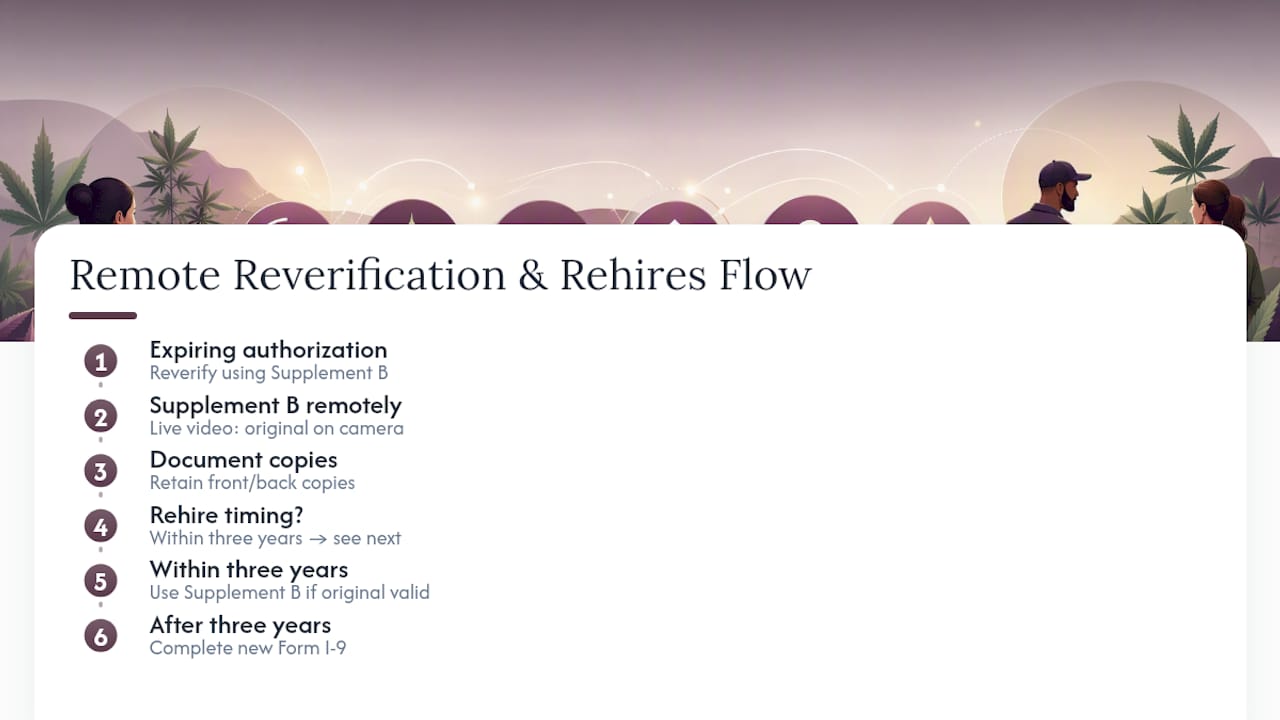
Rehires bring their own wrinkle. If you’re rehiring someone within a few years of their original Form I-9 completion, you may be able to use Supplement B instead of a brand new I-9, provided the original form is still on file and accurate. If more than three years have passed, or the original document information is no longer valid, a new I-9 is required from scratch.
Cannabis employers with seasonal cultivation cycles see this constantly: the same trimmer or grow tech returns year after year. Track rehire dates against the rehire time limit carefully, because guessing wrong here either creates unnecessary paperwork or, worse, skips a required new I-9 entirely. Build rehire tracking into whatever system you use for onboarding so the three-year clock doesn’t get lost between seasons.
What Data Privacy Steps Protect Employee Documents During Remote Verification?
Remote I-9 verification means you’re collecting images of driver’s licenses, passports, Social Security cards, and other sensitive identity documents, then storing them electronically. That’s a meaningfully different risk profile than a paper file locked in a cabinet.
Start with transmission. Employees shouldn’t be emailing photos of a passport to a personal inbox that then forwards to HR. Use a secure upload portal or encrypted file-sharing method instead, and avoid routing sensitive documents through unencrypted email whenever possible.

Storage matters just as much as transmission. Copies need to sit in access-controlled systems, not a shared drive that half the company can browse. Limit access to the HR staff and examiners who genuinely need it, and keep an access log showing who viewed or downloaded a given file.
Retention windows cut both ways here. You’re required to keep copies long enough to satisfy I-9 retention rules, but holding sensitive identity documents longer than necessary, or in systems without adequate security, expands your exposure if there’s ever a breach. Set a clear deletion schedule tied to when retention requirements actually expire, rather than letting old files accumulate indefinitely.
Cannabis employers already dealing with heightened scrutiny from regulators and financial institutions have less margin for a data security misstep layered on top. A breach involving employee identity documents creates liability well beyond immigration compliance.
What Should You Do If You Spot a Discrepancy or Suspect Fraud?
Discrepancies during a video exam usually fall into two categories: honest mismatches and genuine red flags. Telling them apart, and responding to each correctly, matters more than most employers realize.
A name that doesn’t quite match between two documents, a slightly blurry photo, or an address that’s outdated because someone moved recently, these are common and usually resolvable. Ask the employee for clarification or a supplemental document. Don’t reject someone outright over a minor inconsistency that has an innocent explanation.
Genuine fraud indicators look different: a document that appears altered, mismatched security features, information that doesn’t add up under basic questioning, or an employee who becomes evasive when asked to show a document more clearly on camera. If something looks off, you’re not required to accept it. USCIS guidance is clear that you can request additional or different documentation if what’s presented doesn’t reasonably appear genuine or doesn’t reasonably relate to the person presenting it.

Never guess on a document’s validity, and don’t complete Section 2 if you have real doubts. Document exactly what raised concern, request the corrected or replacement document, and if the situation remains unresolved, treat it as a potential compliance and, in some cases, legal matter rather than something to quietly wave through under time pressure. E-Verify cases that come back with a mismatch also need to be handled according to the receipt and referral procedures set out in your E-Verify account, not ignored or overridden.
Roll With Paid’s Perspective: Compliance Isn’t the Finish Line
Cannabis employers tend to treat I-9 compliance as a box to check, and that’s understandable given how much regulatory pressure already sits on this industry. But the workflow laid out above only handles federal employment eligibility paperwork. It does nothing to address the separate, and honestly larger, immigration risk that comes from operating in an industry the federal government still classifies as illegal.
Rollwithpaid works exclusively with high-risk industries, and cannabis operators make up a significant part of that client base. That specialization matters here because generic payroll providers often don’t flag the site-specific E-Verify rules or the immigration nuance that a cannabis business actually needs. Our approach folds I-9 support, E-Verify enrollment guidance, and secure document handling directly into the onboarding process, so audit readiness isn’t something bolted on after the fact.
If you’re unsure whether your current remote verification setup would survive an audit, that’s worth a direct conversation before it becomes a problem instead of after.
— Leah
Get Compliance Support Built for Cannabis Payroll
Rollwithpaid gives cannabis employers something most payroll providers can’t: a system built from the ground up for high-risk industries, not adapted from a generic template after the fact. That means I-9 administration, E-Verify enrollment guidance, and audit-ready document storage are handled as part of the core service, not an afterthought your team has to piece together.
Our Employer of Record model takes on the administrative weight of onboarding, payroll, and HR compliance so you’re not the one tracking three-day deadlines across multiple hiring sites. Clients get audit-ready files without building that infrastructure themselves, and fewer compliance surprises during the busy hiring seasons that hit cultivation and retail operations hardest. If your current process has gaps, or you’re not sure whether it does, review the common payroll mistakes cannabis businesses make and then reach out to Rollwithpaid to talk through a compliance review for your specific hiring sites.