
OSHA Management Software Solves 3 Compliance Gaps for Safety Teams
For most safety managers, the best choice is an integrated EHS platform that automates OSHA 300/300A/301 recordkeeping, captures incidents from the field even without signal, and keeps every record in one system instead of scattered spreadsheets. The three priorities that should drive your decision: recordkeeping and ITA submission readiness, mobile/offline capture for crews who aren’t behind a desk, and a single source of truth that ties incidents, training, and inspections together. Below is the feature checklist, the demo questions, and the cost math that separate a real answer from a sales pitch.
TL;DR:
- Smaller organizations under 100 employees can often use lightweight apps for OSHA recordkeeping, but larger, multi-site operations benefit from integrated platforms with centralized data management.
- Vendors should automatically generate OSHA 300, 300A, and 301 forms from logged incidents, including guiding classification based on OSHA rules, and track ITA submission deadlines.
- Demo tests should include live generation of OSHA forms from sample incidents, offline mobile reporting with data sync, and verification of data export capabilities to ensure reliability and compliance.
- Implementation timelines vary from a few weeks for basic apps to several months for full-scale EHS platforms with integrations, custom workflows, and multi-location setup.
- Software costs often include migration, customization, and integration fees, and ROI can be estimated by comparing incident reduction potential to total cost of ownership.
Table of Contents
- What Type of OSHA Compliance Software Fits Your Team?
- Key Features to Evaluate (Checklist Mapped to OSHA Tasks)
- How to Choose: Selection Criteria and Demo Questions That Actually Matter
- Implementation Timelines, Pricing Shapes, and What Things Actually Cost
- Security, Audit Readiness, and OSHA Recordkeeping Specifics
- What Makes This Guidance Reliable
- Lessons From Real-World Adoption
- Where Rollwithpaid Fits Alongside Your Safety Software
- Where to Verify the Details
- Sources
- FAQ
What Type of OSHA Compliance Software Fits Your Team?
Not every safety team needs the same tool, and buying more platform than you need wastes budget just as fast as buying too little. Four categories dominate this market, and each one solves a different version of the same problem.
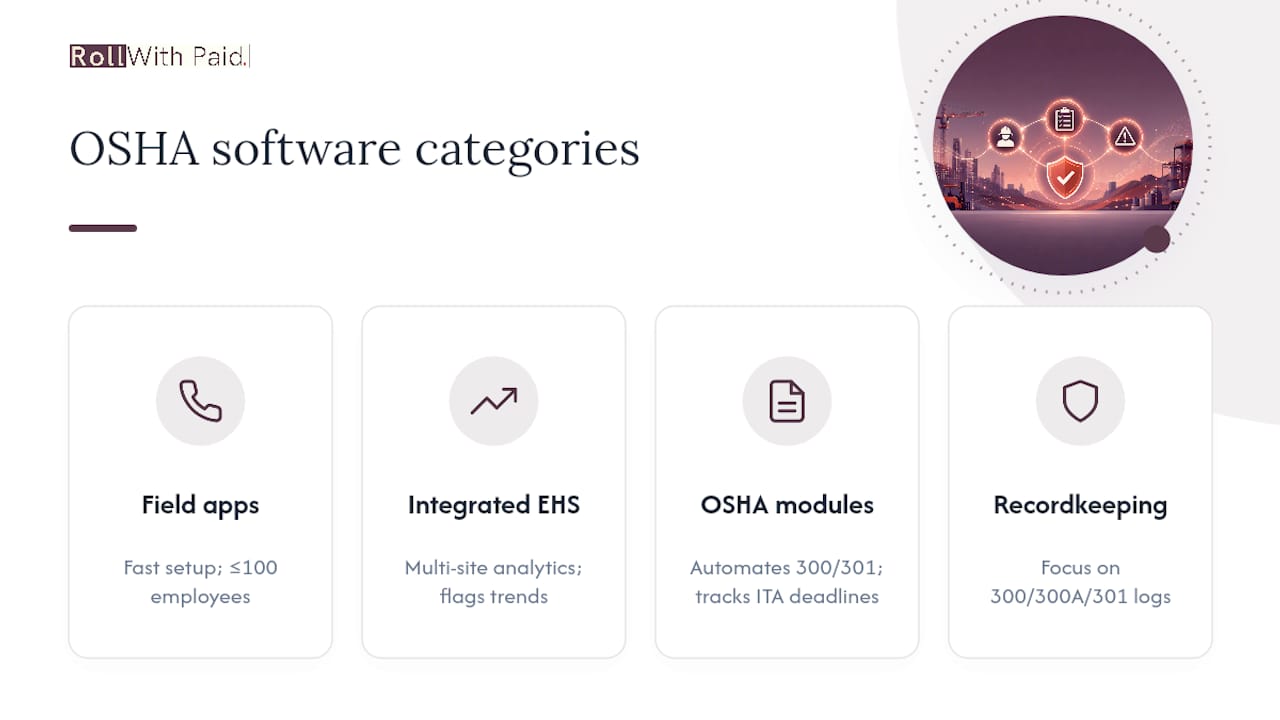
Entry-level field apps are built for speed of adoption. They typically hand a supervisor a phone-based inspection checklist and incident form, generate basic OSHA 300 logs, and skip most of the administrative depth larger organizations need. Platforms like WorkSafely target exactly this buyer, emphasizing instant program setup and automated 300/300A/301 form creation so a small crew can get compliant fast without a dedicated safety department. These tools suit companies under roughly 100 employees, single-site operations, or businesses testing digital compliance for the first time. The tradeoff is limited customization and thinner analytics once you outgrow a single location.
Integrated EHS platforms go further, connecting incident management, training records, audits, and often industrial hygiene data into one system. These fit mid-size to large employers running multiple sites or shifts, where the safety team needs to see patterns across locations rather than reviewing one spreadsheet per plant manager. Vendors like Cority position their platforms around this breadth, pitching a shift from reactive tracking to proactive risk identification through analytics that flag trends across incident and hazard data. The tradeoff here is implementation time. Broader systems take longer to configure correctly, and undertrained rollout teams often use a fraction of what they’re paying for.
Compliance platforms with OSHA-specific modules sit in between. They aren’t full EHS suites, but they go deeper than a basic field app on recordkeeping mechanics. Tools such as SmartQHSE automate OSHA 300/300A/301 generation, guide recordable classification against 29 CFR 1904.7, and track Injury Tracking Application (ITA) submission deadlines with built-in alerts. This category suits safety managers whose main pain point is recordkeeping accuracy and audit defense, not full EHS convergence.
Specialist OSHA recordkeeping tools are narrower still, focused almost entirely on the 300 log, 300A summary, and 301 incident report. They’re a reasonable fit for a compliance officer who already has separate systems for training and inspections and just needs the recordkeeping piece to stop being a manual, error-prone process.
When should you pay for platform breadth instead of a lighter field app? The answer usually comes down to site count and audit history. A single location with low injury rates can often run on a lightweight app for years. Multi-site operations, or any organization that has faced an OSHA inspection or a workers’ compensation dispute where documentation gaps caused problems, benefit from the reporting consistency and centralized audit trail that broader EHS platforms provide.
Key Features to Evaluate (Checklist Mapped to OSHA Tasks)
Every OSHA management software claims to handle recordkeeping. The differences show up in the details, and those details are exactly what you should test in a demo rather than take on faith from a sales deck.
Recordkeeping and ITA automation. The software should generate OSHA 300, 300A, and 301 forms directly from logged incidents, not require manual re-entry. Look for guided recordable classification that walks a user through the 29 CFR 1904.7 criteria (medical treatment beyond first aid, days away from work, restricted duty) rather than leaving that judgment call entirely to whoever files the report. Platforms built around this task, like SmartQHSE, also track ITA submission deadlines and flag when your organization’s annual electronic submission is due.
Incident reporting and classification. A strong incident module lets a field worker attach photos and get a supervisor signature at the point of injury, not three days later from memory. It should also carry root cause notes and a corrective-action tracker that shows whether a fix was actually closed out, not just logged and forgotten.
Inspections and audit workflows. Scheduled inspections need offline capture (more on that below), evidence attachments, and a clear audit trail showing who inspected what and when. This is the feature that turns a compliance program from reactive to preventive.
Training and credential tracking. The system should track OSHA-required training completions, flag expiring certifications before they lapse, and tie training records to individual employees so you can prove competency during an inspection.
Analytics and predictive flags. Some vendors now market AI-driven trend detection that scans incident and hazard data for early warning patterns, a capability Cority highlights as a shift toward proactive prevention. Treat this as a genuinely useful add-on, not a replacement for good recordkeeping. The insight quality depends entirely on the data feeding it. Garbage data in still means garbage predictions out, no matter how the analytics are marketed.
Support, data ownership, and exportability. Confirm you can export your full historical record in a usable format (PDF logs, CSV data) without a support ticket or extra fee, and ask how the vendor handles data ownership if you ever switch platforms.
- OSHA 300/300A/301 generation and CFR-guided recordable classification
- Incident capture with photo, signature, and corrective-action closure tracking
- Offline-capable inspection workflows with evidence attachments
- Training and credential tracking tied to individual employees
- Trend analytics or AI flags, evaluated on data quality, not marketing language
- HR, payroll, and LMS integration options
- Exportable compliance records with no vendor lock-in
Pro Tip: Before you sign anything, ask the vendor to export a full year of sample OSHA 300A data as a PDF, on the spot, during the demo. If they hesitate or need “engineering” to pull it, that’s a preview of what happens the week before an inspection.
How to Choose: Selection Criteria and Demo Questions That Actually Matter
Picking software off a features page is how safety teams end up with a tool nobody uses by month four. A working evaluation framework tests the software against your actual workflow, not the vendor’s script.
Run through this checklist before you get anywhere near a contract:
- ITA compatibility. Confirm the platform generates data in a format compatible with OSHA’s electronic submission requirements and tracks your organization’s specific deadline based on establishment size and industry code.
- Migration support. Ask exactly who moves your historical 300 logs and training records into the new system, and whether that’s included or billed as professional services.
- Mobile and offline UX. Don’t take “mobile-friendly” at face value. Test it on a phone with airplane mode on, in the actual conditions your crews work in.
- Admin controls. Check whether you can set role-based permissions so a site supervisor sees only their location’s data while corporate safety sees everything.
- Compliance exports. Verify the system produces audit-ready PDFs of the 300, 300A, and 301 forms without manual formatting.
- API and integration options. If you already run payroll or HR software, ask whether the platform has an API or native connector, or whether integration means manual CSV uploads twice a month.
In the demo itself, don’t let the vendor drive the whole presentation. Bring your own test case: hand them three sample incidents (one clearly recordable, one clearly first-aid-only, one ambiguous) and ask them to generate a 300A from scratch, live, using their software. Watch how the classification logic handles the ambiguous case. That single test tells you more than an hour of slides.
Ask them to show you offline incident reporting on an actual mobile device with connectivity disabled, then reconnect and show you the sync. If the demo team can’t do this without a “we’ll follow up,” treat that as a real signal about field reliability.
Watch for a few red flags during the sales process. Vague answers about data export terms usually mean the vendor makes it deliberately hard to leave. Pricing that requires a call to reveal “custom implementation fees” often hides costs that should have been disclosed upfront. And be skeptical of “unlimited training credits” that turn out to cover only the software’s own certification content rather than your OSHA-required courses.
On the negotiation side, ask for a data ownership clause in writing, request a trial period tied to a real pilot group rather than a sandbox demo account, and push for a fixed number of implementation hours rather than open-ended professional services billing.
Implementation Timelines, Pricing Shapes, and What Things Actually Cost
Rollout speed depends heavily on which category of software you picked. A lightweight field app built for fast onboarding, like the WorkSafely model of instant program generation, can have a small crew logging incidents within days. A full EHS platform with integrations, custom workflows, and multi-site configuration realistically takes two to six months from contract signature to full adoption.
Pricing models vary by vendor, but they tend to fall into a few recognizable shapes:
- Per-seat pricing, where you pay based on the number of users who need full access. This favors smaller teams but can get expensive fast as headcount grows.
- Site license pricing, a flat fee per location regardless of user count. This favors larger, single-site operations with many field workers.
- Module-based pricing, where recordkeeping, training, and inspections are priced separately. This lets you start narrow and add capability later, but costs can creep as you add modules.
- Freemium or low-cost reporter seats, where basic incident submission is free or cheap but supervisor and admin dashboards cost extra. This suits organizations that want broad frontline adoption without paying full price per employee.
The sticker price is rarely the full cost. Data migration from spreadsheets or legacy systems, custom workflow configuration, integrations with your existing HR or payroll platform, and professional services hours for setup all add to the real bill. A rough way to estimate ROI: multiply your average cost per recordable incident (including medical costs, lost productivity, and any workers’ compensation premium impact) against the reduction in incidents you’d reasonably expect from better tracking and faster corrective action. Even a modest drop in recordable incidents often justifies the software cost within the first year for mid-size operations.
Security, Audit Readiness, and OSHA Recordkeeping Specifics
An audit-ready system produces certain outputs on demand, not eventually. That means immutable audit logs showing who entered or edited each record, properly formatted PDF versions of the OSHA 300, 300A, and 301 forms, and an executive certification workflow, since OSHA requires a company executive to certify the accuracy of the annual 300A summary.
ITA submission readiness matters here too. Covered establishments must post the 300A summary annually and, depending on establishment size and industry, submit data electronically through OSHA’s Injury Tracking Application. Software that tracks your specific deadline and flags it in advance removes one of the most common compliance failures: simply forgetting the date.
On the security side, ask vendors about a few concrete signals rather than accepting “secure and compliant” as an answer:
- SOC 2 compliance or an equivalent third-party security audit
- Role-based access control so field employees can’t edit historical records
- Documented data retention policies that match OSHA’s five-year recordkeeping requirement
- Encrypted data storage and transmission, especially for mobile field capture
Nonfatal workplace injury and illness rates remain a significant national concern, and Bureau of Labor Statistics trend data shows why regulators and insurers alike pay close attention to how consistently employers track and respond to incidents. Software that can produce downloadable logs, timestamped photo evidence, and a full corrective-action trail during an actual inspection turns what could be a stressful scramble into a fifteen-minute export.
What Makes This Guidance Reliable
This guidance draws on how OSHA structures its own recordkeeping rules, how the Department of Labor frames employer obligations, and how current OSHA-focused platforms like SmartQHSE and WorkSafely actually build their recordkeeping and mobile workflows. Feature claims from platforms like Cority around analytics are presented as vendor capability, not independent verification, because that distinction matters when you’re comparing marketing copy to what a tool does in practice.
Some HR and payroll services serve high-risk employers, particularly in the cannabis sector, where audit readiness isn’t optional and documentation gaps carry real financial consequences. That vantage point shapes this article’s emphasis on exportability, data ownership, and demo-tested claims over feature-list marketing. Organizations validating a vendor’s training content quality can also cross-check credentials against frameworks from bodies like the American Society of Safety Professionals.
Lessons From Real-World Adoption
Software rollouts fail more often from adoption problems than feature gaps. The pattern that works best: pilot with one site or one crew for 30 to 60 days before committing organization-wide. Track incident submission rates, how quickly corrective actions close, and training completion during that window. If those numbers don’t move, the platform probably isn’t the problem.
Prioritize supervisor workflows first, especially in field-heavy businesses. Supervisors are the chokepoint. If they find the mobile app clunky or unreliable offline, adoption stalls no matter how good the back-end analytics are.
Simple reporter seats for frontline workers, small incentives for supervisors who hit corrective-action deadlines, and quick daily check-ins during the pilot tend to build habits faster than a mandatory training session ever does.
— Leah
Where Rollwithpaid Fits Alongside Your Safety Software
OSHA recordkeeping software protects you on the injury side of compliance. It doesn’t touch the payroll classification errors, workers’ compensation misalignment, or documentation gaps that trigger a separate kind of audit risk entirely. Rollwithpaid is built for exactly that gap, specializing in payroll and HR compliance for high-risk industries like cannabis, where a misclassified worker or a late filing can cost far more than a missed inspection ever would.
Through an Employer of Record model, Rollwithpaid handles multi-state payroll execution, I-9 support, and regulatory filings so your documentation stays audit-ready on both the payroll and HR side, not just the safety side. That means your workers’ comp classifications match your actual payroll data, a mismatch that shows up fast in an audit and rarely in your favor. Services span Payroll Execution, HR & Compliance Solutions, employee onboarding, and multi-state hiring support, all built around the compliance realities that traditional payroll providers tend to avoid. If audit-ready recordkeeping matters enough that you’re evaluating OSHA software this carefully, it’s worth applying the same standard to your payroll and HR documentation. Check current service rates and see where the gaps in your current setup might be.
Where to Verify the Details
- OSHA regulations and recordkeeping guidance
- U.S. Department of Labor compliance resources
- BLS nonfatal workplace injury and illness data
- User reviews and ratings for safety compliance apps
- Risk mitigation software perspectives
Sources
FAQ
What Is the Best OSHA Management Software for Small Businesses?
Small crews generally do best with lightweight field apps built for fast setup, like the model WorkSafely uses with instant program generation and automated 300/300A/301 forms. Organizations under roughly 100 employees rarely need full EHS platform breadth on day one.
How Long Does OSHA Software Implementation Typically Take?
A focused pilot can go live in two to six weeks, while a full organization-wide rollout with integrations and custom workflows typically takes two to six months. Timelines depend mostly on data migration complexity and how many sites need configuration.
Does OSHA Software Handle Electronic ITA Submission Automatically?
Some platforms, including tools built around OSHA-specific compliance modules, track your establishment’s electronic submission deadline and generate ITA-compatible data automatically. Always confirm this capability directly in a demo rather than assuming it from marketing copy.
Can OSHA Recordkeeping Software Replace Payroll Compliance Tools?
No. OSHA software tracks injuries, training, and inspections, but it doesn’t handle payroll classification, workers’ compensation alignment, or HR documentation, which is where Rollwithpaid’s compliance services focus specifically for high-risk industries.
What Should I Ask a Vendor Before Signing a Contract?
Ask for a live demo generating an OSHA 300A from sample incidents, confirm offline mobile functionality with a real connectivity test, and get data export terms and ownership rights in writing before signing anything.
Roll With Paid. is not a law firm and does not provide legal advice. This article summarizes Minnesota law as of August 2026 and is general information only. Tip arrangements are fact-specific; before changing a policy, consult employment counsel or contact DLI Labor Standards at 651-284-5075.