
HR Teams: Run Two Pay Cycles First to Match Leave Software by Category
If your leave tracking still runs through a shared spreadsheet, the right fix depends on what’s actually breaking. Compliance-first engines suit multi-state employers juggling FMLA and state paid-leave laws; payroll-integrated modules suit companies that just need PTO balances to land correctly on paychecks; simple trackers suit small teams that outgrew email requests. Review the shortlist categories below, match one to your risk profile, then run the vendor checklist that follows.
TL;DR:
- Match your leave management needs to the correct software category, such as simple trackers, payroll-integrated modules, or compliance-based engines, based on your risk profile.
- Prioritize features like compliance coverage, accrual logic, approval workflows, and real-time payroll sync to ensure your system supports legal and operational accuracy.
- Budget for higher implementation costs with compliance-first and multi-state platforms, and always demand itemized, fully loaded first-year pricing.
- Ensure payroll and leave data are integrated into a single system to reduce legal risk and streamline auditing and reconciliation processes.
- Conduct thorough live testing with real data and plan for a multi-week rollout process to prevent payroll errors and ensure smooth adoption.
Table of Contents
- What Is the Best Leave Management Software Category for Your Business?
- What Should You Compare When Evaluating Leave Software?
- What Features Actually Matter in Leave Administration Software?
- What Does Leave Management Software Cost?
- Which Integrations Actually Matter for Leave Software?
- How Do You Roll Out New Leave Software Without Disrupting Payroll?
- What Are the Tradeoffs of Adopting Leave Management Software?
- Why Payroll and Leave Data Should Never Live in Separate Systems
- The Category Matters More Than the Brand Name
- A Managed Alternative When Software Alone Isn’t Enough
- Where to Keep Researching Before You Buy
- Sources
- FAQ
What Is the Best Leave Management Software Category for Your Business?
There’s no single best leave management software for every employer, because the “best” choice depends entirely on how complex your leave obligations actually are. A ten-person marketing agency in one state has a fundamentally different problem than a cannabis cultivator running shifts across three states with different paid sick leave laws. Treating both like the same shopping decision is how HR teams end up either overpaying for features they’ll never touch or under-buying and getting burned during an audit.
The standard industry term for this category is absence management software, and vendor directories like the SHRM Vendor Directory list products ranging from bare-bones PTO trackers to enterprise-grade compliance engines. That range is the point. You’re not picking “the best app.” You’re picking the right class of tool for your headcount, your state footprint, and how much of your leave process touches statutory law versus internal policy.
Here’s how the categories break down, and the signal that should push you toward each one.
- Simple PTO trackers. Best for teams under 50 employees in a single state, with one straightforward accrual policy. These tools trade compliance depth for speed. Setup often takes days, not months, and pricing tends to be transparent per-user, though lightweight trackers usually can’t handle intermittent FMLA leave or multi-jurisdiction accrual rules.
- Payroll-integrated leave modules. Best for companies whose biggest pain point is leave balances not syncing with paychecks. If your payroll provider already offers a leave add-on, this route minimizes reconciliation headaches because the data never leaves one system.
- Dedicated leave and absence engines. Best for mid-size to large employers managing multiple states, complex accrual tiers, or frequent intermittent leave cases. These platforms centralize leave requests, approvals, and reporting so absence trends and capacity gaps surface automatically, per Gartner’s absence management category overview.
- Compliance-first rules engines. Best for regulated or high-risk employers where a wrong leave determination creates real legal exposure. Some platforms evaluate federal, state, local, and internal policy rules together and return a single auditable determination for eligibility and entitlement, rather than leaving that judgment call to an HR generalist.
- Combined leave and accommodation platforms. Best for employers who handle FMLA, ADA accommodation requests, and state leave laws as one connected workflow rather than three separate processes. Vendors in this space build audit trails specifically because FMLA and ADA overlap creates the most litigation-prone gray area in leave administration.
Pro Tip: Don’t shortlist by feature count. Shortlist by which category matches your single biggest failure point today, whether that’s speed, payroll sync, or legal defensibility. A platform with 40 features you don’t need is still the wrong purchase.
One data point worth sitting with: employers using purpose-built leave platforms report measurable drops in administrative time and payroll or leave errors, along with better visibility into absence trends, according to AbsenceSoft’s own product research. That’s a vendor-reported figure, so treat it as directional rather than a guarantee, but it tracks with what HR teams describe anecdotally after moving off spreadsheets: fewer emergency Friday-afternoon “did this get approved?” messages, and fewer payroll corrections the following cycle.
The mistake most buyers make is starting with a vendor name instead of a category. Pick the category first. The vendor conversation gets a lot shorter once you know which box you’re actually shopping in.
What Should You Compare When Evaluating Leave Software?
The features page on a vendor’s website will tell you almost nothing useful. What separates a good fit from an expensive mistake is how a platform handles the specific dimensions that touch your legal exposure and your payroll accuracy. Here’s what to compare, and the exact questions to bring into a demo.
- Compliance coverage. Ask the vendor directly: “Walk me through how your system determines FMLA eligibility for an employee who just crossed the 12-month, 1,250-hour threshold in a state with its own paid family leave law stacked on top.” Watch whether the answer is a confident walkthrough or a vague gesture at “customizable rules.”
- Accrual logic and carryover. Ask how the system handles a mid-year policy change, negative accrual balances, and use-it-or-lose-it caps that vary by state. Some states ban forfeiture policies outright, so a rigid accrual engine can quietly put you out of compliance.
- Approval workflows. Ask whether approvals can route by department, by manager hierarchy, or by leave type, and whether the system escalates automatically if a request sits unanswered. A single-approver bottleneck is a common complaint once teams scale past one location.
- Reporting and analytics. Ask for a sample absence trend report before you buy, not after. You want to see whether it flags patterns like chronic Monday absences or a department nearing FMLA exhaustion before it becomes a legal problem.
- Integrations and data flow. Ask specifically how leave balances sync with your payroll system, and whether that sync is real-time or batch. A nightly batch sync sounds fine until someone takes unpaid leave mid-week and payroll runs before the update lands.
- Security and data handling. Ask where employee medical documentation for FMLA or ADA claims is stored, who can access it, and whether that access is logged. This matters more than most buyers realize until a records request lands on their desk.
How you weight these six dimensions should shift with your buyer profile. A single-state retailer with 30 employees can deprioritize compliance coverage and weight accrual logic and approval speed instead. A multi-state cannabis operator or healthcare employer should weight compliance coverage and security access controls above everything else, because those are the two areas where a mistake becomes a legal filing rather than an annoyed employee.
Pro Tip: Bring a real, messy edge case from your own workforce into every demo, not a generic scenario the vendor has rehearsed. If a sales engineer can’t answer your actual intermittent-leave-plus-holiday-overlap question on the spot, that’s a preview of what support will look like after you sign.
What Features Actually Matter in Leave Administration Software?
Vendor marketing pages love the word “automated,” but automation only helps if it’s automating the right decision. Here’s what to actually look for, feature by feature, and how to tell a real capability from a slide-deck promise.
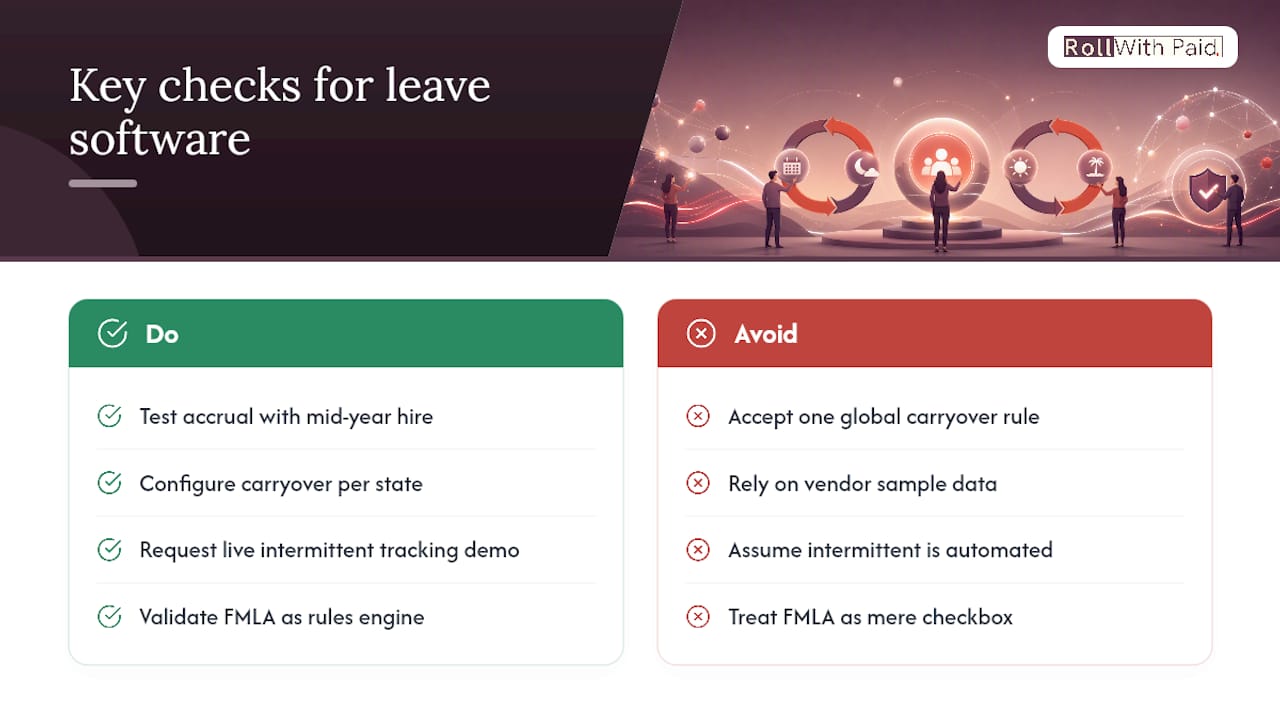
Accrual engines. A real accrual engine handles tiered rates (more PTO after year three, for instance), prorated accrual for new hires, and negative balance rules without a support ticket. During a trial, set up a mid-year hire and a policy change simultaneously and see whether the balance calculates correctly without manual intervention.
Carryover and forfeiture logic. Some states cap or outright ban use-it-or-lose-it policies. A platform that lets you configure carryover limits per state, rather than one global rule, is doing real compliance work. A platform that only offers one company-wide carryover setting is asking you to manage the legal nuance yourself, in a spreadsheet, next to the software you just bought to avoid spreadsheets.
Intermittent leave handling. This is where FMLA gets genuinely difficult. Intermittent leave means an employee takes leave in blocks, sometimes hours at a time, rather than one continuous stretch. Ask the vendor to show you how the system tracks hour-by-hour usage against a rolling 12-month FMLA entitlement. If they can’t demonstrate it live, assume it’s a manual workaround.
FMLA basics, handled correctly. At a high level, FMLA entitles eligible employees at covered employers to up to 12 weeks of unpaid, job-protected leave for qualifying reasons. The complexity isn’t the 12 weeks. It’s tracking eligibility, notice requirements, and how state paid-leave laws interact with that federal baseline. A platform that treats FMLA as a checkbox rather than a rules engine will eventually miscalculate something.
Approvals and calendar sync. These should feel almost boring in a demo. Requests should sync to Outlook or Google Calendar automatically, and approvals shouldn’t require logging into a separate portal to see who’s out next week.
Reporting. Look for pre-built reports on absence trends, accrual liability, and FMLA usage by employee, not just a raw data export you’ll need a spreadsheet to interpret anyway.
Validate every one of these in a live trial with your own data, not the vendor’s sample dataset. Sample data is built to make every feature look flawless.
What Does Leave Management Software Cost?
Pricing in this category usually follows one of three shapes: per-employee-per-month (the most common), flat-tier pricing based on headcount bands, or a percentage add-on to an existing payroll or HRIS contract. Per-user pricing tends to run cheaper at small headcounts and more expensive as you scale past a few hundred employees, where a flat enterprise tier often wins out.
The sticker price is rarely the real cost. Implementation fees, data migration from your old system, custom accrual rule configuration, and training all show up as separate line items in many proposals. Compliance-first engines and combined leave and accommodation platforms tend to carry higher implementation costs because configuring multi-state rule sets takes real setup time, not a checkbox.
Here’s a simplified first-year cost framework to run before you sign anything. These figures are illustrative, not vendor quotes, meant to show you the categories to ask about, not a specific price to expect.
| Cost Component | Simple Tracker | Payroll-Integrated Module | Compliance-First Engine |
|---|---|---|---|
| Per-user monthly fee | Low | Low to moderate | Moderate to high |
| Implementation/setup fee | Minimal | Moderate | Significant |
| Data migration | Usually included | Sometimes billed separately | Often billed separately |
| Custom rule configuration | Not typically offered | Limited | Core part of onboarding |
| Ongoing support tier | Basic, often self-serve | Standard | Dedicated support common |
Ask every vendor for the fully loaded first-year number in writing, not just the monthly per-user rate. Ask what happens to pricing at renewal, since some vendors raise rates significantly after year one once switching costs feel too high to walk away.
Pro Tip: Request itemized pricing broken out by module, not a single bundled number. This tells you exactly which features you’re paying for and gives you leverage to drop a module you don’t need instead of accepting an all-or-nothing package.
Which Integrations Actually Matter for Leave Software?
Integration quality often matters more than a long features list. A solid payroll or HRIS sync prevents the downstream reconciliation work that eats HR’s Friday afternoons every pay period.
The integrations that matter most are your payroll system (so leave balances flow into pay calculations correctly), your existing HRIS (so employee data doesn’t live in two disconnected systems), and your calendar platform (so managers see absences without logging into yet another tool).
There’s a real difference between a native connector, built and maintained by the vendor for a specific payroll platform, and a generic API or webhook approach that requires your IT team to build and maintain the connection. Native connectors are more reliable but limit you to supported payroll systems. API-based integrations are more flexible but put ongoing maintenance on your plate.
Before signing anything, run a pilot integration test:
- Confirm leave balances sync correctly across at least three consecutive pay cycles, not just one.
- Test what happens when an employee takes unpaid leave mid pay-period, not just a clean full-week absence.
- Verify accrual changes made mid-cycle actually reflect in the next payroll run.
- Check that terminated employees stop accruing immediately, not on a delay.
A practical detail worth following: reconcile a real payroll test run and compare results across three full pay cycles before going live, since many integration bugs only surface across actual payroll runs, not in a single clean test scenario.
How Do You Roll Out New Leave Software Without Disrupting Payroll?
A rushed rollout is how leave software earns a bad reputation internally. The tool isn’t usually the problem. The implementation plan is.
- Map every existing leave policy before you touch the software. Document every accrual rate, carryover rule, and exception by location and employee class. This step alone surfaces inconsistencies most companies didn’t know they had.
- Clean your existing leave balance data. Migrating messy balances into a new system just moves the mess. Reconcile discrepancies manually before migration, not after.
- Align stakeholders early. Payroll, HR, and department managers should all sign off on the mapped policies before configuration starts, since disagreements surface faster in a meeting than three months into a live rollout.
- Run a pilot with one department or location. Validate accruals and exemption rules against real employee data before rolling out company-wide.
- Reconcile the pilot’s first full pay cycle by hand. Compare the system’s output against what payroll would have calculated manually. Any mismatch here is far cheaper to fix now than after full rollout.
- Communicate the launch clearly to employees. Explain what changes for them (how to request leave, where to check balances) in plain language, not a system announcement full of internal jargon.
- Reconcile the first full company-wide pay cycle after launch. Treat this as mandatory, not optional, even if the pilot went smoothly.
Pro Tip: Budget two full pay cycles of parallel tracking, old system and new system running side by side, before fully retiring your legacy process. The cost of running both briefly is nothing compared to the cost of a payroll error that reaches employee paychecks.
Realistically, a full evaluation-to-launch timeline for a mid-size employer typically spans a few months, including phases for shortlisting, demoing, contract negotiation, configuration, pilot, and reconciliation before full launch. Compliance-first engines and multi-state configurations tend to sit at the longer end of that range.
What Are the Tradeoffs of Adopting Leave Management Software?
The upside is real: centralized requests, fewer manual accrual errors, and reporting that actually surfaces absence patterns before they become a staffing crisis or a compliance gap. For employers managing FMLA and ADA together, an audit trail showing exactly which rule applied and why can be the difference between a defensible file and a costly dispute.
But there are real tradeoffs worth naming honestly:
- Vendor lock-in risk. Migrating leave history and accrual data out of a platform later can be expensive and slow, so read exit and data-export terms before signing, not after.
- Contract red flags. Watch for auto-renewal clauses with short cancellation windows, and pricing that jumps sharply after an introductory year.
- Configuration overhead. Compliance-first engines take longer to set up correctly, and a rushed configuration can produce wrong determinations with confidence, which is worse than no automation at all.
- Ongoing maintenance. Leave laws change. Someone on your team needs to own keeping policy configurations current, or the system’s compliance value quietly erodes.
If your current leave process is genuinely simple, one state, one policy, under 20 employees, it may make sense to postpone a full platform purchase and instead tighten your existing process with a lightweight tracker. Buying a compliance-first engine you don’t yet need just adds cost and configuration overhead without solving a problem you actually have.
Why Payroll and Leave Data Should Never Live in Separate Systems
Payroll and leave management aren’t really two separate problems. They’re two records of the same set of facts, hours worked, hours off, and pay owed, and when those records live in disconnected systems, the gap between them is where compliance risk quietly builds up. An employee on intermittent FMLA leave whose hours don’t sync correctly to payroll isn’t just a bookkeeping headache. It’s a documentation gap that surfaces at the worst possible moment: a Department of Labor audit or a workers’ comp claim.
This is exactly the alignment problem Rollwithpaid was built around, for employers in high-risk industries like cannabis cultivation and dispensary operations where compliance margins are already thin. When payroll and leave administration run through one accountable process rather than two disconnected systems, misclassification errors and late filings become far less likely, because the same team tracking hours is the team calculating pay and leave entitlement.
For regulated employers, a rules engine that consolidates federal, state, and local leave logic in one place can save real time per case and meaningfully reduce compliance risk, according to Mitratech’s leave compliance research. That principle holds whether the “engine” is software or a managed HR process. What matters is that one accountable party owns the determination, with a documented trail behind it, rather than leaving it split across departments that rarely compare notes until something goes wrong.
Leah covers payroll compliance and HR operations for high-risk and regulated industries, with a focus on how payroll and leave administration intersect for audit readiness.
The Category Matters More Than the Brand Name
Most buying guides in this space lead with a top-ten vendor list, which is exactly backward. The vendor doesn’t matter until you’ve correctly diagnosed which category you’re shopping in, and most HR teams skip that step entirely because it’s less satisfying than reading a ranked list.
Here’s the uncomfortable truth: a lot of leave software purchases fail not because the tool was bad, but because it was the wrong category for the buyer’s actual risk profile. A compliance-first engine bought by a 15-person single-state company is overkill that nobody configures correctly, because nobody on staff understands the rules well enough to set it up right. A simple tracker bought by a multi-state employer with intermittent FMLA cases is undershooting risk in a way that only becomes visible during an audit.
The buyer profile should drive the decision, not the demo. If your biggest exposure is legal complexity across states, prioritize compliance coverage over price. If your biggest exposure is payroll reconciliation, prioritize integration quality over feature count. Get that match right first, and the vendor conversation becomes a lot less consequential than most guides make it sound.
— Leah
A Managed Alternative When Software Alone Isn’t Enough
Software solves the tracking problem. It doesn’t solve the “who’s actually responsible when a determination is wrong” problem, and for high-risk employers, that gap is where real exposure lives. If your business operates in cannabis cultivation, dispensary retail, or another regulated, high-risk sector, the complexity you’re managing usually extends well beyond leave balances into worker classification, multi-state payroll filings, and workers’ compensation risk that a standalone software subscription was never built to carry.
Managed Employer of Record models combine payroll, HR compliance, and leave administration under one accountable team rather than relying on separate tools that require configuration and maintenance. This approach aims to reduce late filings by consolidating management of multi-state payroll filings, I-9 support, and workers’ comp classification into a single system instead of using separate systems that require manual reconciliation. If you’re comparing software categories and realizing your actual bottleneck is compliance risk rather than a tracking interface, learn what an Employer of Record model actually covers and see whether it fits your business better than another software subscription. You can also review current pricing or head to the Rollwithpaid homepage to start a conversation about what audit-ready payroll and leave management actually looks like for a high-risk operator.
Where to Keep Researching Before You Buy
A few resources worth bookmarking as you move from shortlist to contract. Gartner’s absence management software category collects verified buyer reviews across vendors, useful for gut-checking a shortlist against real user complaints. The SHRM Vendor Directory gives a fuller picture of how many products exist in this space and how they’re categorized. For teams weighing whether automation extends beyond leave requests into broader HR workflow approvals, AmmarAI’s productivity workflow guide is a useful adjacent read on where automation genuinely saves time versus where it just adds another dashboard.
Sources
- Best Absence Management Software reviews | Gartner
- Mitratech Leave — Leave management software for confident leave decisions
- AbsenceSoft — Leave and accommodation management system
FAQ
What Is the Best Software for Leave Management?
There isn’t one universal answer. The best leave management software depends on your headcount, how many states you operate in, and whether your biggest risk is compliance, payroll sync, or simple process speed, which is why matching your buyer profile to a category comes before comparing specific vendors.
What Are the Top HRMS Systems Worth Considering Alongside Leave Software?
Most full HRMS platforms bundle leave tracking with payroll, benefits, and performance management, and the right one depends on whether you need leave as a standalone module or fully integrated into a broader HR system. Evaluate HRMS platforms on the same compliance and integration dimensions covered above rather than treating “top lists” as a ranking of universal winners.
What Employee Monitoring Features Should Leave Software Include?
Leave software isn’t employee monitoring in the surveillance sense. It should track absence patterns, accrual usage, and FMLA hour consumption to support capacity planning and compliance, not monitor productivity or activity.
What’s the Best Software for PTO Accrual and Balances?
The best fit depends on complexity: a simple per-user tracker handles single-state, single-policy accrual well, while multi-state employers with tiered accrual rates and carryover rules need a platform with configurable accrual engines and multi-level approval workflows, as covered in the features section above.
How Long Does It Take to Implement Leave Management Software?
A mid-size employer should expect several weeks from vendor shortlist to full company-wide launch, including pilot testing and payroll reconciliation, with compliance-first and multi-state configurations requiring longer timelines.
Recommended
Roll With Paid. is not a law firm and does not provide legal advice. This article summarizes Minnesota law as of August 2026 and is general information only. Tip arrangements are fact-specific; before changing a policy, consult employment counsel or contact DLI Labor Standards at 651-284-5075.