
HR Teams: Match FMLA Tracking Software to Risk and Roll Out in 90 Days
Choose a compliance-first leave and case-management platform once you’re handling more than roughly 15 to 20 FMLA cases a year, run multi-state payroll, or carry real audit exposure. Below that volume, a payroll-integrated HRIS module with a solid leave feature often covers you. Run a 20-minute demo checklist against two vendors before you decide, and count last year’s case volume first.
TL;DR:
- Software must accurately run the rolling 12-month eligibility calculation and verify hours worked without manual re-derivation to avoid legal errors.
- Intermittent leave tracking needs to be precise, calculating hours based on actual scheduled time rather than manual entries, especially for variable schedules.
- Vendors should automatically generate and update required notices and forms aligned with jurisdiction-specific deadlines, ensuring compliance as laws evolve.
- The rules engine must handle multi-jurisdiction policies, including federal, state, and local laws, providing a single, defensible determination with an audit trail.
- Prior to implementation, ensure integration with payroll updates hours promptly, and test complex, layered leave scenarios with real data to prevent costly mistakes.
Table of Contents
- What the Best FMLA Tracking Software Actually Needs to Do
- The Demo Checklist That Exposes Vendor Marketing Claims
- Matching Your Organization to the Right Category of Tool
- Integration Testing: What to Verify Before Go-Live
- Building an Audit-Ready Record
- Rolling Out Your Chosen System in 90 Days
- How Employees and Managers Actually Use the System Day to Day
- What FMLA Software Actually Costs
- Comparing Capabilities Across Solution Categories
- What Good Support and Training Look Like
- What Reviews and Ratings Actually Tell You
- Why I’d Rather See HR Teams Slow Down on This Decision
- How Rollwithpaid Handles Audit-Ready Payroll and Compliance
- Official Forms and Resources Worth Bookmarking
- Sources
- FAQ
What the Best FMLA Tracking Software Actually Needs to Do
Most “leave tracking” tools were built for vacation requests, not federal compliance. That distinction shows up the moment you have an employee splitting a certification into two-hour absences three times a week. A basic PTO tracker logs the time. Real FMLA compliance software has to determine whether that time even counts toward the 12-week entitlement, and defend that determination months later if a regulator or a plaintiff’s attorney asks.
Eligibility and entitlement logic is where this starts. The software needs to run the rolling 12-month lookback correctly, confirm the employee has worked 1,250 hours in the prior 12 months, and verify 12 months of service, all without you re-deriving the math by hand every time a request comes in. Get this wrong and you either deny leave someone was entitled to or grant it to someone who wasn’t, and both mistakes carry legal weight.
Intermittent leave tracking separates serious FMLA management solutions from spreadsheet workarounds. A worker with a variable schedule who takes two hours off on a day they were scheduled for ten uses a different fraction of their entitlement than someone using two hours against a four-hour shift. Software that can’t do this arithmetic accurately will quietly drain someone’s balance wrong for months.
Automated notices and packet generation matter more than most buyers expect walking in. The law requires specific documents at specific moments: the Notice of Eligibility and Rights & Responsibilities, medical certification forms, and designation notices, each with its own deadline. Vendors that build compliance engines around automatic form updates keep these packets current as regulations shift, so HR isn’t manually swapping out a DOL form because someone forgot the agency revised it.
A layered rules engine is the feature that separates a leave management system from a true FMLA compliance platform. Federal FMLA rules don’t operate alone. State-level paid family leave, local ordinances, and your own company policy on top-up pay all stack together, and an employee’s case might touch three or four of these at once. Vendors like Mitratech build rules engines that evaluate federal, state, local, and company policy together and return one documented determination instead of leaving HR to reconcile conflicting rules manually.
Audit trail and timestamped documentation is the feature you don’t appreciate until a case gets challenged. Every determination, every notice sent, every hour logged should carry a timestamp and a record of which rule version produced it. Courts have made clear that both what employers say and what they do in FMLA cases carries weight, so a system that can reconstruct exactly what happened and when is worth more than one that just logs a final status.
Payroll and HRIS integration rounds out the list, because none of the above matters if the hours in your leave system don’t match the hours in your payroll run. A mismatch between what the leave platform says an employee worked and what payroll paid them is one of the fastest ways to generate a wage claim on top of an FMLA dispute.
Here’s what to check before you sign anything:
- Does the eligibility calculation show its math, not just a yes/no result?
- Can intermittent hours be pulled from actual time records, not manual entry?
- Are required notices generated automatically with correct deadlines?
- Does the rules engine handle your specific state and local leave laws?
- Is every determination timestamped and tied to a rule version?
- Does the system reconcile hours with your payroll provider automatically?
Pro Tip: Ask the vendor to show you a case where an employee qualified under state paid leave and FMLA simultaneously. If they can’t produce a real example, the “layered rules engine” on their sales deck is probably a marketing phrase, not a working feature.
The Demo Checklist That Exposes Vendor Marketing Claims
Vendor demos are built to show you the easy case. Your job is to ask for the messy one. Here’s the sequence that separates real FMLA management solutions from good-looking dashboards.
-
Ask for an overlapping-leave scenario. Request a live eligibility determination for an employee taking concurrent FMLA and state paid family leave, with a workers’ comp claim layered on top. If the sales rep hesitates or pulls up a canned slide instead of the actual product, that’s your answer.
-
Run an intermittent-hour calculation from raw punches. Hand them a week of irregular time clock data and ask the system to calculate exactly how many FMLA hours were used. Practitioner testing guides recommend exactly this kind of scenario-based demo test over a feature checklist, because feature lists don’t reveal calculation errors.
-
Export a full audit packet on the spot. Ask for a single export containing the eligibility notice, the medical certification, the communications log, and the decision rationale for one case. If this takes a support ticket instead of a button click, your legal team will feel that gap during an actual audit.
-
Show a versioned rule change. Ask how the platform handled a state law update last year and whether it can show you which determinations were made under the old rule versus the new one. This single question filters out systems that overwrite history instead of preserving it.
-
Test the payroll sync cadence. Confirm whether integration with your HRIS or payroll provider runs through a live API or a nightly batch file. Batch syncs mean a same-day leave request might not reflect in payroll until the next business day, which matters if you’re running weekly payroll.
-
Ask about role-based access and retention. Confirm who can see medical certification details, how long records are retained after separation, and whether access logs exist for anyone who viewed a file.
Automation vendors report processing time drops of 60 to 75 percent, cutting the average leave case from roughly 7 to 8 hours of manual work down to about 1.75 to 2 hours. That number is a reasonable benchmark to hold a vendor to during your demo. If they can’t demonstrate a path to anything close to that on a real case, the ROI pitch in their sales deck is aspirational, not something their current clients are seeing.
Matching Your Organization to the Right Category of Tool
Volume and complexity, not company size alone, decide which category of solution fits. A 40-person company with employees across six states carries more compliance risk than a 300-person company operating in one location.
Spreadsheets and templates work for very small employers running single-state operations with a handful of leave cases a year. They’re free, familiar, and easy to hand off. The problem is scale: template and spreadsheet resources are explicit that these tools don’t hold up for multi-state employers or real audit risk. A spreadsheet can’t run a rolling lookback calculation reliably across dozens of employees, and it has no audit trail beyond whatever notes someone remembered to type into a cell.
HRIS modules with a leave feature are usually sufficient once you’ve outgrown spreadsheets but still have straightforward cases, mostly single-state, with low intermittent leave volume. Roundups of the space consistently point buyers toward general HRIS platforms for this middle tier, with dedicated standalone trackers reserved for organizations that need leave tracking without full HR functionality. The limit shows up fast when you add a second or third state, because most HRIS leave modules weren’t built to layer state paid leave laws on top of federal FMLA rules.
Compliance engines and case-management platforms become necessary once you’re multi-state, handling meaningful intermittent leave volume, or facing real litigation exposure. This is the category built around the rules engine and audit trail features described above, and it’s the right fit once case volume or legal complexity outpaces what a generalist HRIS module can defend.
Outsourcing to a TPA or Employer of Record deserves consideration when your internal HR team simply doesn’t have the bandwidth to manage leave case-by-case, or when you’re operating in a high-risk, heavily regulated industry where a compliance misstep carries outsized consequences. An Employer of Record model shifts the administrative burden and much of the liability to a partner built specifically for that risk profile.
Red flags that mean you need to move categories now, not next quarter:
- You’ve had a leave determination challenged or overturned in the last year.
- Your HR team can’t produce a case’s full documentation within 24 hours of a request.
- You’re calculating intermittent hours by hand for more than a handful of employees.
- You’ve expanded into a new state and haven’t updated your leave policy engine.
Integration Testing: What to Verify Before Go-Live
The features on a vendor’s website mean nothing if the data feeding them is wrong. Before you sign, get specific about what has to reconcile between systems: employee service date (for the 12-month eligibility test), hours-worked history (for the 1,250-hour threshold), and pay events tied to leave (so payroll and leave balances agree).
API integrations sync in near real time, which matters most for intermittent leave, where a Tuesday absence needs to reflect in the employee’s balance before Thursday’s payroll run. File-based, batch integrations move data on a schedule, often nightly, which introduces a lag that’s usually fine for continuous leave but risky for frequent intermittent claims. Ask which model the vendor actually uses, not which one their marketing page implies.
Vendor roadmaps shift, too. The HR tech space sees regular acquisition activity, and deals like Intuit’s acquisition of the HR platform GoCo can change what integrations a vendor supports or prioritizes going forward. Ask directly whether your specific payroll provider integration is contractually guaranteed or simply “on the roadmap.”
A workable testing plan before full rollout:
- Pick 5 to 10 pilot employees across different leave types (continuous, intermittent, and reduced schedule).
- Run one full payroll cycle and manually reconcile hours in both systems.
- Repeat for a second cycle to catch anything the first pass missed.
- Set a recurring monthly reconciliation check for at least the first two quarters.
Pro Tip: Train managers before the system goes live, not after. The most common early failure isn’t a software bug, it’s a manager approving a leave request outside the system because they didn’t know the workflow existed.
Building an Audit-Ready Record
An audit-ready FMLA file has five components, and if any one is missing, you’re relying on memory instead of documentation. That’s the exact gap that turns a routine Department of Labor inquiry into a drawn-out legal exposure.
- Eligibility notices and entitlement calculations, showing the math behind the rolling 12-month lookback and hours-worked threshold, not just the final approval.
- Medical certifications, complete and dated, with any follow-up requests for clarification documented alongside the original submission.
- Communications log, capturing every notice sent to the employee and every response received, with timestamps.
- Attachments, including any supporting documentation the employee submitted, retained in their original form.
- Decision rationale, tied to the specific rule version in effect at the time, so you can show exactly why a determination came out the way it did.
Retention timelines vary by exposure type, but a conservative baseline is at least three years past the leave’s end date for standard FMLA records, longer if litigation is pending or anticipated. Check your state’s specific requirements, since some run longer than the federal floor.
Proving a determination after the fact means showing your rules engine’s state at the time, not its current configuration. This is exactly why versioned rule tracking matters: a determination made under last year’s state paid leave rules has to be defensible on those rules, not the ones in effect today. Courts have been direct that inconsistent documentation undermines an employer’s position, since what you documented and how you acted both get scrutinized.
When legal review is imminent, export the full packet, preserve the original file format rather than a reformatted summary, and log who accessed the record and when. That chain-of-custody detail is often what separates a defensible record from one opposing counsel can pick apart.
Rolling Out Your Chosen System in 90 Days
A rushed implementation is where most FMLA software failures actually start, not in the software itself. A short, disciplined rollout beats an ambitious one.
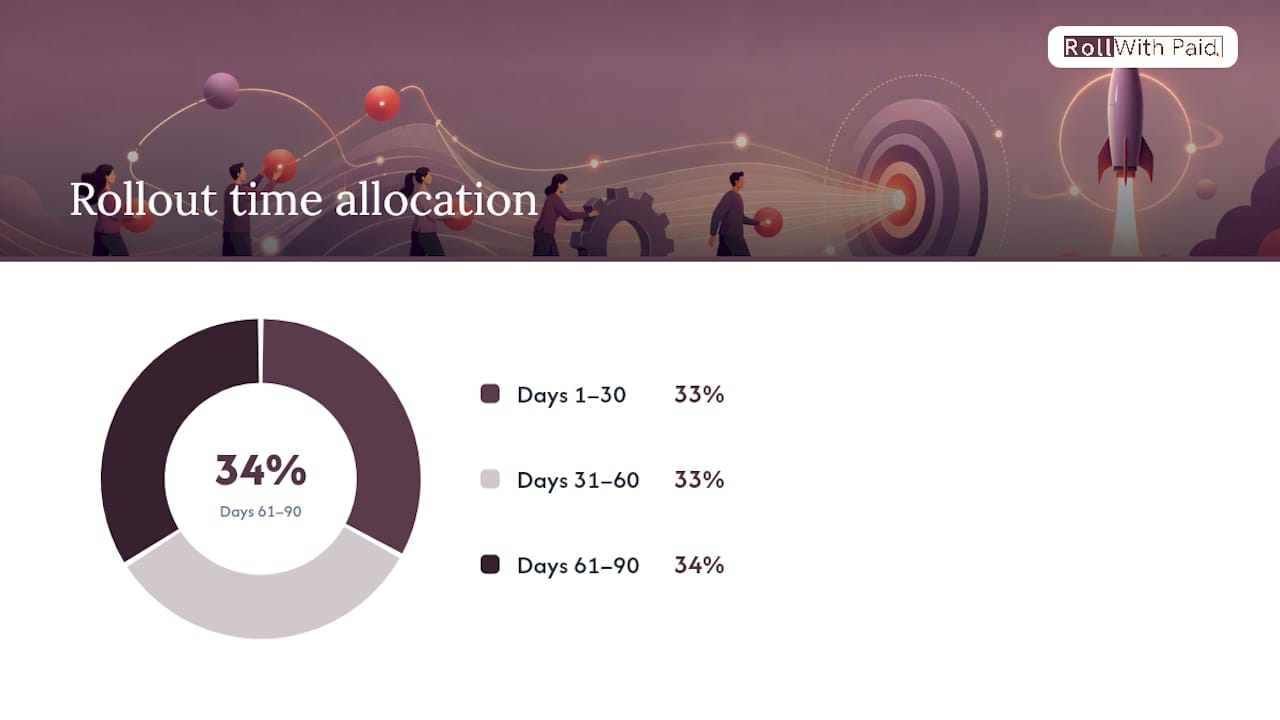
- Days 1 to 30: Map your employee data fields (service dates, hours history, state assignments) into the new system. Run 3 to 5 pilot cases in parallel with your current process before switching over. Configure your state and local rule layers now, not after launch.
- Days 31 to 60: Turn on live payroll and HRIS integrations. Expand pilot testing to a broader group of managers and run a sample audit export to confirm the packet contains everything legal review would expect.
- Days 61 to 90: Complete full cutover from your old process. Set a recurring reporting schedule and assign clear ownership: one person accountable for the system, even if multiple people touch it day to day.
Assign an HR lead as the primary owner, with payroll, IT, and legal each reviewing their piece before go-live. Skipping the legal review step is the most common shortcut teams regret. A short, structured 30/60/90 plan built around pilot cases and manager training heads off the majority of early failures.
Pro Tip: Don’t let IT own the rollout timeline alone. The fastest failures happen when integrations go live before HR has actually tested a real leave scenario end to end.
How Employees and Managers Actually Use the System Day to Day
Self-service matters as much as the compliance engine behind it. Employees need a straightforward way to submit a leave request, upload a medical certification, and check their remaining balance without calling HR for every question.
Manager workflows deserve equal attention, because managers are usually the first point of contact when someone mentions needing time off. The best systems route a request to the manager for basic acknowledgment, while keeping the actual eligibility determination and any compliance-sensitive detail with HR. That separation matters: managers shouldn’t be making legal judgment calls about entitlement, and they shouldn’t see medical certification details at all.
Notifications close the loop. Employees should get automatic alerts when a certification is due, when a determination is made, and when their balance is running low. Managers should be notified when someone on their team is approved for intermittent leave, so a two-hour absence on a Tuesday doesn’t come as a surprise. Get this workflow wrong and you end up with the two most common employee complaints in leave management: not knowing where their request stands, and a manager who didn’t know someone was on approved leave until they didn’t show up.
What FMLA Software Actually Costs
Pricing in this category runs on a few common models: per-employee-per-month fees, flat platform fees with tiered case limits, or a hybrid that charges a base rate plus per-case fees once you exceed a threshold. Rates depend heavily on how many states you operate in and whether you need the full rules engine or a lighter leave-tracking module.
Small HR teams handling FMLA as one part of a broader HRIS platform often find a bundled leave module sufficient, priced as an add-on to their existing per-employee HR software rather than a separate line item. This keeps costs predictable but caps how sophisticated the compliance logic can get.
Mid-size and enterprise employers with multi-state exposure typically need a dedicated compliance platform, and pricing there scales with case volume and jurisdiction complexity rather than headcount alone. Two companies with 500 employees each might pay very different rates if one operates in three states and the other in twelve.
Before comparing quotes, calculate your actual monthly case volume and how many states you have employees in. Vendors price around complexity, and a quote based on headcount alone without factoring in your state footprint will usually be inaccurate once you get into contract negotiations.
Comparing Capabilities Across Solution Categories
The features that matter most vary sharply depending on which category of tool you’re evaluating, and side-by-side comparisons only make sense within a category, not across wildly different tool types.
Within HRIS leave modules, the differentiators are usually integration depth with the existing payroll system, ease of manager approval workflows, and how well intermittent leave gets tracked without a dedicated rules engine underneath it.
Within compliance-focused platforms, differentiation comes down to rules engine sophistication (how many jurisdictions it layers correctly), audit packet completeness, and how fast the vendor updates the system when a new state leave law takes effect.
Within standalone leave trackers, the value proposition is usually simplicity and price, aimed at organizations that need clean tracking without the overhead of a full compliance engine, appropriate for lower-complexity leave environments.
The mistake buyers make is comparing a standalone tracker’s price against a compliance platform’s feature set. They solve different problems. Decide your category first, using the volume and multi-state thresholds covered earlier, then compare options within that category.
What Good Support and Training Look Like
Support quality matters more in this category than in most HR software purchases, because a support delay during an active FMLA case has real legal consequences, not just an inconvenience.
Look for vendors offering a dedicated implementation specialist during onboarding rather than a generic support queue. Ask specifically how fast a compliance-related question gets answered, not a general technical issue. A vendor that treats “the rules engine flagged something unexpected” with the same urgency as “I forgot my password” hasn’t built support around the actual stakes of this software.
Training availability should extend past HR to managers, since they’re the ones fielding the first conversation when an employee needs leave. Confirm whether training is a one-time onboarding session or an ongoing resource, especially important as state leave laws change and your rules engine configuration needs periodic review.
What Reviews and Ratings Actually Tell You
Customer reviews are useful for spotting patterns, especially around support responsiveness and how often a vendor’s rules engine needs manual correction. What they’re less useful for is verifying compliance accuracy, since most reviewers rating a leave platform aren’t in a position to evaluate whether an eligibility calculation was legally correct.
Read reviews with a specific lens: look for repeated complaints about integration reliability, delayed support during time-sensitive cases, or manual workarounds users had to build themselves. A pattern of “great interface, but we had to double-check every calculation” is a serious warning sign for compliance software, even if the overall star rating looks strong. Weigh reviews from organizations similar to yours in size and state footprint more heavily than a broad average score.
Why I’d Rather See HR Teams Slow Down on This Decision
Most HR teams buy leave software the way they’d buy a scheduling tool, comparing dashboards and price per employee. That’s backwards for FMLA specifically, because the cost of a wrong eligibility determination isn’t a bad user experience. It’s a legal exposure with a dollar figure attached.
The trade-off between automation and manual review deserves more scrutiny than most vendor pitches invite. Full automation is fast, but a rules engine making a wrong call at scale is worse than a slower manual process that catches the edge case. The right answer isn’t choosing one over the other. It’s automation for the routine calculations and a human review step for anything touching concurrent leave types or a contested case, which is the same layered approach we’ve built into how Rollwithpaid handles compliance for higher-risk clients, resulting in zero late filings across the accounts we manage.
Three things worth carrying into your own vendor selection: test the messy scenario, not the clean one. Confirm who owns the system after go-live, not just who configures it. And weight audit trail quality as heavily as price, because it’s the feature you’ll only fully appreciate the one time you need it.
— Leah
How Rollwithpaid Handles Audit-Ready Payroll and Compliance
If you’ve read this far and realized your case volume, multi-state exposure, or industry risk profile puts you past what a self-managed software platform can comfortably handle, outsourcing the whole function is a legitimate next step, not an admission of defeat.
An Employer of Record model can be especially useful in high-risk industries such as cannabis businesses, where compliance mistakes carry outsized consequences and traditional payroll providers may be reluctant to engage. This model typically includes multi-state payroll, I-9 support, regulatory filings, and policy documentation handled by a team familiar with the specific audit and workers’ compensation exposures common in these industries, rather than a generic HR platform retrofitted for the situation. Clients aim to benefit from timely filings and streamlined onboarding without necessarily adding internal headcount to manage these processes. If your team is spending more time defending leave determinations than growing the business, that’s the signal to stop building the case internally. Visit Rollwithpaid to request a demo, or review our HR compliance guidance for dispensaries and cultivators to see how the model applies to your specific operation.
Official Forms and Resources Worth Bookmarking
Keep the Department of Labor’s official FMLA forms page on hand, since it houses the current WH-381 Notice of Eligibility and Rights & Responsibilities forms your software should be generating automatically. Pair that with Mitratech’s overview of layered leave rules engines for a clear technical reference on how multi-jurisdiction determinations should work, and Rollwithpaid’s guidance on Minnesota paid leave obligations if you operate in that state.
Sources
- 5 Best Leave Management Software
- Leave Management Software | FMLA, ADA & State Leave Compliance | Pulpstream
FAQ
What software can I use to track FMLA leave?
Options range from HRIS modules with a built-in leave feature to dedicated compliance platforms with a full rules engine, and the right one depends on your case volume and how many states you operate in.
How do I keep track of FMLA leave accurately?
Track eligibility using the rolling 12-month lookback and 1,250-hour threshold, log intermittent hours against actual scheduled time, and keep every notice and determination timestamped for later reference.
How do employers track FMLA leave for compliance?
Employers use a rules engine that layers federal, state, local, and company policy to generate a documented, defensible eligibility determination for each case, backed by an audit trail.
What is the best software for tracking leave overall?
The best FMLA tracking software for your organization is the one whose category matches your case volume and multi-state complexity. A compliance-first platform suits high-volume, multi-state employers, while an HRIS leave module often suffices for smaller, single-state teams.
When should a business consider outsourcing FMLA management entirely?
Consider outsourcing to a TPA or Employer of Record when internal HR bandwidth can’t keep pace with case volume, or when your industry carries elevated compliance risk that a standard software purchase won’t fully address.
Recommended
Roll With Paid. is not a law firm and does not provide legal advice. This article summarizes Minnesota law as of August 2026 and is general information only. Tip arrangements are fact-specific; before changing a policy, consult employment counsel or contact DLI Labor Standards at 651-284-5075.